custom.css not working - Forum | JoomShaper
Staff replied Templates

custom.css not working

Asked by Pascal 9 months ago Last activity 9 months ago

Im using politicas template.
Inside I added this custom.css : /templates/politicas/css/custom.css

But I noticed css not working
But when I add this to custom css in template settings it is working??

How can I make sure it uses my first custom.css
Using Joomla 5.4.1
PHP 8.2.29

Regards,

Pas

5 replies

Paul Frankowski Senior Staff
9 months ago · edited

Hoi Pascal,

in general it works, but in some older templates there was mistake and custom.css is loaded before template styles :/ and that's why you don't see your custom CSS changes.

To fix it right, you have to edit index.php file. Are you OK with that?

OR

2nd idea: Inside Template Options > Custom Code > Before Head just paste that line

<link href="/new_gb/templates/politicas/css/custom.css" rel="stylesheet"> Save & Close.

then that .css file will be loaded after all template styles and javascript. Not perfect, but 100% helps.

Paul Frankowski Senior Staff
9 months ago · edited

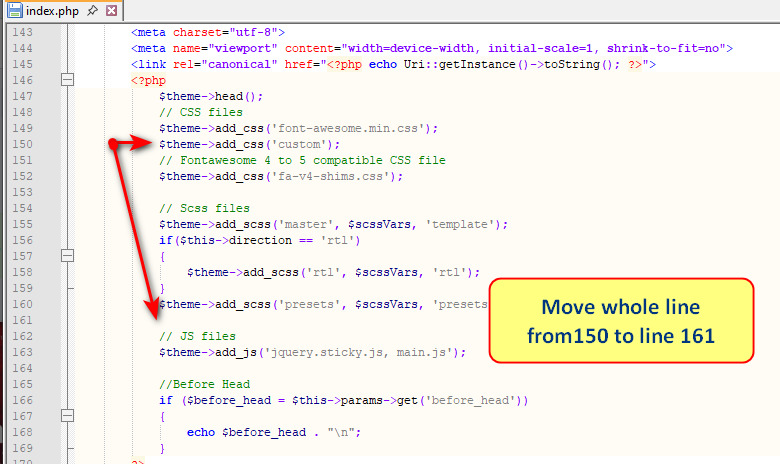
If first fix idea is OK for you, and you're not afraid of touching php file. You can do that also from Joomla Template File Manager, or FileManager in cPanel. Remember to save changes. Quick move in few seconds.

info_3660_2025.jpg

$theme->add_css('custom'); that line must be moved down before JS files, line 161 seems to be empty. No risk.

Pascal Asked this

I'm using latest Politicas 2.0.2
I prefer custom.css inside template for all customizations.
What option is best to use and also update proof. Caould you explain how to ?

Regards,
Pascal

Paul Frankowski Senior Staff

Use 2nd tip. From my first answer. Very robust method.

Pascal Asked this

Thanks Paul,

Works great!

Regards,
Pascal

Paul Frankowski Senior Staff

Great. Please mark topic as solved.

Log in to reply.