

Custom.css Not Working
P
Pascal
Im using politicas template. Inside I added this custom.css : /templates/politicas/css/custom.css
But I noticed css not working But when I add this to custom css in template settings it is working??
How can I make sure it uses my first custom.css Using Joomla 5.4.1 PHP 8.2.29
Regards,
Pas
Website
https://pasvorm.com
6 Answers
Order by
Oldest

Paul Frankowski
Accepted AnswerHoi Pascal,
in general it works, but in some older templates there was mistake and custom.css is loaded before template styles :/ and that's why you don't see your custom CSS changes.
To fix it right, you have to edit index.php file. Are you OK with that?
OR
2nd idea: Inside Template Options > Custom Code > Before Head just paste that line
<link href="/new_gb/templates/politicas/css/custom.css" rel="stylesheet"> Save & Close.
then that .css file will be loaded after all template styles and javascript. Not perfect, but 100% helps.
Paul Frankowski
Accepted AnswerIf first fix idea is OK for you, and you're not afraid of touching php file. You can do that also from Joomla Template File Manager, or FileManager in cPanel. Remember to save changes. Quick move in few seconds.
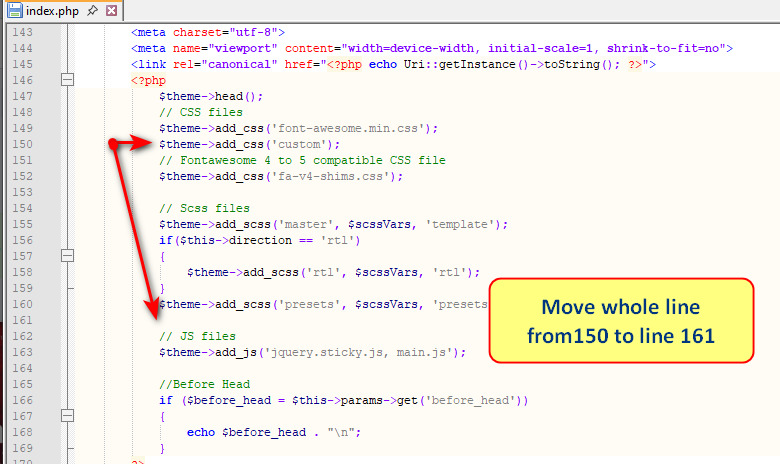
$theme->add_css('custom'); that line must be moved down before JS files, line 161 seems to be empty. No risk.
P
Pascal
Accepted AnswerI'm using latest Politicas 2.0.2 I prefer custom.css inside template for all customizations. What option is best to use and also update proof. Caould you explain how to ?
Regards, Pascal