I was given css code to remove the logo at the top I don't know if that has something to do with the menu vanishing in mobile version. Can you help me bring back the menu back for the mobile version?
Solved
Templates
Menu missing on mobile version
Accepted answer
Marked as the solution
Paul Frankowski Senior Staff
o.0
4 more replies
Gregory Loucks Asked this
Hello? Can someone help me please?
Paul Frankowski Senior Staff
Hi Gregory,
It's still weekend, also time zones difference so delays with forum response are normal.
About problems with missing [=] menu, tips are in Helix documenation > https://www.joomshaper.com/documentation/helix-framework/troubleshooting-faq .
Paul Frankowski Senior Staff
7 months ago
· edited
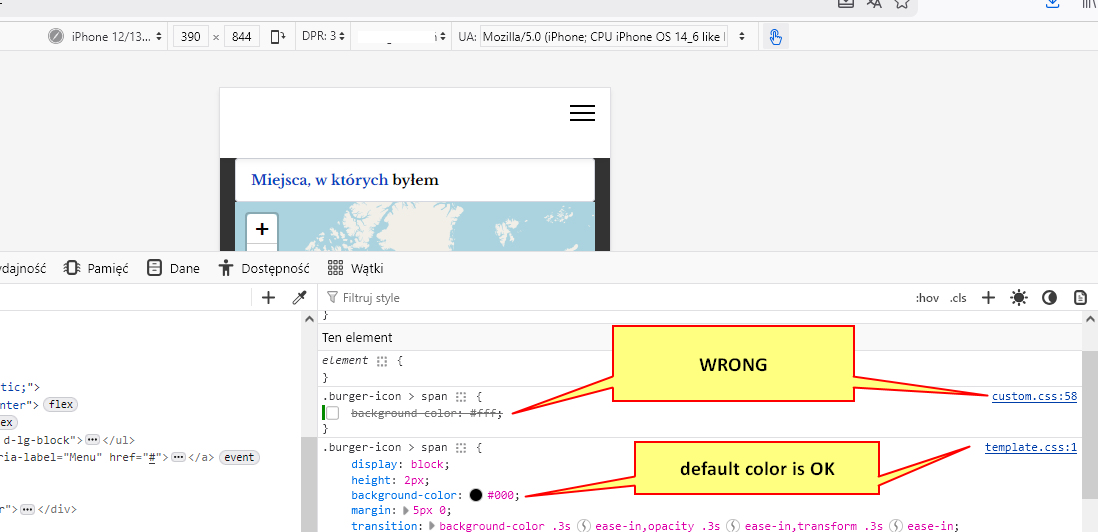
In your case problem was created by someone (you?) who added that line inside custom.css file (line 58)
.burger-icon > span {
  background-color: #fff;
}
white menu [=] lines on white header background means "I don't see them", right. Like in old commedy "See No Evil, Hear No Evil" (1989).
Solution: remove those 3 lines (not needed!) or use dark color (#111) - that's all, so simple.
Gregory Loucks Asked this
what is the correct custom css for removing the logo uptop "only" of pc version? but i still want the logo on the right off canvas menu for mobile devices
Paul Frankowski Senior Staff
So simple.
- If you have Custom Header - just disable it for Desktop view in Layout
- If you have Predefined Header - you can use below Custom CSS
@media screen and (min-width: 1024px) {
#sp-logo .logo-image, #sp-logo img, #sp-logo a {display: none;}
}
It will hide logo element.
Gregory Loucks Asked this
Thank you! Have a good one!
Log in to reply.