Joomla 4 Offcanvas Menu issue - Forum | JoomShaper
Solved Helix Framework

Joomla 4 Offcanvas Menu issue

Asked by Tim v.d.w 5 years ago Last activity 4 years ago

Hello Joomshaper Team,

i updated my site to Joomla 4 overall, it seems to work correct but i have a problem with my offcanvas menu, i made an own menu modul (type Pagebuilder) which was shown on offcanvas position, after update my mobile menu was empty. i read i have to adjust right or left in template options for ovcanvas settings. In the offcanvas settings i have to decide which menu i want in offcanvas position, but i want no menu from the list, i want my own modul with navigation which is in modules, position offcanvas.

So in the moment my offcanvas menu shows to menus inside
one time the main menu that i don´t want to show in offcanvas
and
one time underneath my own menu which i want to show in offcanvas.

how i am able to hide the main menu from the offcanvas menu and only shown my own modul in offcanvas?

Domain is www.360-grad-konzept.com

Thanks Tim

Accepted answer

Marked as the solution
Paul Frankowski Senior Staff
5 years ago · edited

Tim, I don't see any pills inside your menu - so it was fixed already.

About Offcanvas menu - please think out the box:

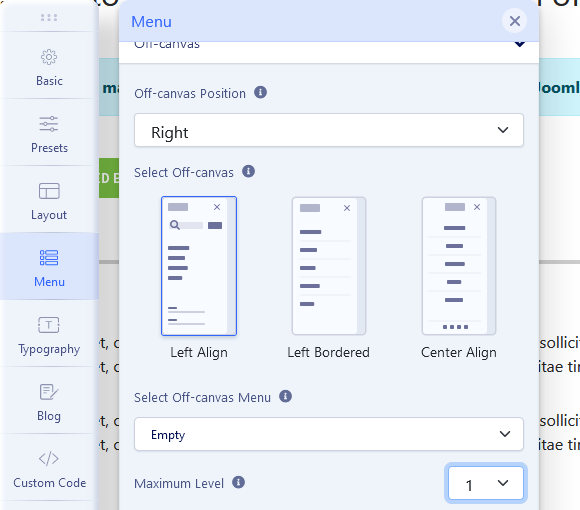
  1. Create a NEW menu - just empty, no menu items inside,
  2. Then choose that "empty" menu inside Template Options.
  3. Save settings. Then empty menu will be used.

Step 1
foto_6849_2021.jpg

Step 2

foto_6850_2021.jpg

6 more replies

Ofi Khan Staff

Hello Tim v.d.w

Sorry, this feature does not exist. You can show different menu to the offcanvas. But no other module can be shown in that position.

Best regards

Tim v.d.w Asked this

??? take a look at my site ... you will see that my modul is shown in the offcanvas menu!

www.360-grad-konzept.com

before i updated to joomla 4 only my own modul was shown in offcanvas menu, now my modul is below and the main menu was shown above, but i want that only my modul is shown in offcanvas (as it was before i update to Joomla 4).

Ofi Khan Staff

Please use this CSS to Template Options -> Custom Code -> Custom CSS

.offcanvas-inner .nav-pills {
    display: none !important;
}
Tim v.d.w Asked this

thanks for the help..but unfortunately that didn't work - I cleared the cache, after put the the lines in custom code .. but the main menu is still displayed in the canvas menu.
may be you have another idea

Ofi Khan Staff

Please share your administrator access here to check the issue. Use the Hidden Content box to share the credentials.

Tim v.d.w Asked this

Hi Paul,

yes with an empty menu i get it run. thanks for your help.

best wishes Tim

Log in to reply.