Off-canvas menu is empty (and link shown twice) - Forum | JoomShaper
Solved Helix Framework

Off-canvas menu is empty (and link shown twice)

Asked by clausjepsen 4 years ago Last activity 4 years ago

Please look into this - newer versions of Helix has not fixed it.

I have selected main menu to be displayed in off-canvas menu only. I gives two errors:

  1. "MENU" link is displayed twice
  2. When clicking either of them, the screen blurs, but no menu is shown - making it impossible to nagivate.

Please help as this is the live production site..

Accepted answer

Marked as the solution
Paul Frankowski Senior Staff

I added a single line of custom CSS inside your custom.css - to hide the first menu. Check at the beginning line with display: none.

By now it was all I could do. I have to play on my demo and next week talk with developer.

6 more replies

Paul Frankowski Senior Staff
4 years ago · edited

Hi,
Point 1& 2 fixed.

All problems were caused by wrong template & menu module settings - nothing wrong with template.

foto_6902_2021.jpg

BTW

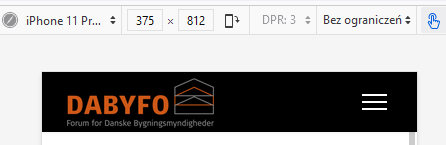
I only made mobile menu [=] icon white by custom CSS.

foto_6903_2021.jpg

clausjepsen Asked this

Hi,

Unfortunately, it is still not solved, as I do not want the MegaMenu shown. I only want off-canvas on both PC and other devices.

When I set Menu-type to: Off-canvas in the menu, two off-canvas menus are displayed.

How do I get rid of one of them?

Paul Frankowski Senior Staff

Oh, ok. Fixed.

But clear the browser cache deeply to reload custom.css.

clausjepsen Asked this

Thanks a ton.

As this came out of nowhere with the latest updates, could you explain what you did to fix it?
I am working on migrating the site to Joomla4 and see same problem in my sandbox.

/Claus

Jerry Tonneman

I'm wondering about the same issue:

The hamburger icon is shown twice when I align it to the right. When I align the menu tot the left only one icon is shown.

I have enabled the 'compress css and Javascript files' which resulted in a not working front editor.
Therefore I reversed that action.

Paul Frankowski Senior Staff

Hoi Jerry,

In your template custom.css I used:

#offcanvas-toggler.offcanvas-toggler-secondary {
    display: none !important;
}

And should be OK now. I hope next update will fix it.

Log in to reply.