SP Easy image gallery - dark layer in detail image/ customizing not succesfull - Forum | JoomShaper
Solved Extensions

SP Easy image gallery - dark layer in detail image/ customizing not succesfull

Asked by abrac Büro & Grafikservice Andrea Brandt 4 years ago Last activity 4 years ago

Hi Joom Shaper Team,
first: I'm a very satisfied customer :-)

I use SP Easy Image Gallery: https://fewoamsee23.de/galerie/fewoamsee23-galerie
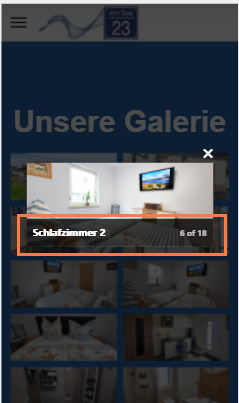
Works fine, but because of the very flat format of the customers imager there is a problem while using it on mobile devices: The dark layer for the description below covers almost half the image because of the format.

I tried the hints in your documentation: https://www.joomshaper.com/documentation/joomla-extensions/sp-easyimagegallery/gallery-customization , but there is no result while using the code in my custom css..
Where is my fault ?

Thanks for your answer,
Klaus

Accepted answer

Marked as the solution
Toufiq Senior Staff

Done

18 more replies

Toufiq Senior Staff

Hi there,

Thanks for contacting us. Sorry for the inconvenience. Please share an screenshot that you want to do exactly.

-Thanks

Ofi Khan Staff

Hello Klaus Brandt

Thanks for appreciating our work. I have added this CSS to css/custom.css file. Please check your site now.

.speasyimagegallery-gallery-item:hover > div:after {
    opacity: 0 !important;
}

Best regards

abrac Büro & Grafikservice Andrea Brandt Asked this

Hello Ofi Khan,

thank you for your help and reaction.
Unfortunately, the result is exactly the same as before: the dark bar has not become transparent. It looks like nothing has changed.

Especially on smartphones, the dark, barely transparent bar obscures the detailed image in an unflattering way.

Is there another possibility?!


https://fewoamsee23.de/images/dieter/screenshot_handy_galerie.jpg

Toufiq Senior Staff

Please check & let me know. Thanks

abrac Büro & Grafikservice Andrea Brandt Asked this

Hallo Toufiq,
thank you, but even now it's still the same, Background is still dark. :-(

Seems that nothing would help???

Toufiq Senior Staff

Please check now. Thanks

abrac Büro & Grafikservice Andrea Brandt Asked this
4 years ago · edited

Dear Toufiq,
unfortunately it is still the same :-(
Still no chances....

When I use the Chrome/Fdge "Inspect" function, I am able to change the bachground color:

.speasyimagegallery-image-content ..
to:
-> background: rgba(0,0,0,.1);

This may fullfill my whish. In the DETAIL-Image
But when I change that in the custom ccs, there still is no result... ??

By the way I used a custom.css direct inside the hu-template-files root... your's is insinde the css root.. My fault ??

Toufiq Senior Staff

Give me permission of your google drive

Log in to reply.