Hello,
I try to change the header color on just one page here (sceen_1)but it do not change nothing.
Does it overwtite this custon css or not (screen 2) ?
How can I do ?
Thank you
Romaric
Hello,
I try to change the header color on just one page here (sceen_1)but it do not change nothing.
Does it overwtite this custon css or not (screen 2) ?
How can I do ?
Thank you
Romaric
Hi.
You are confused with the code. You have added different code in different places. The green code takes precedence.
Use the browser code inspector to identify problems.
Both of your snippets are visible in the code inspector. One takes precedence over the other.
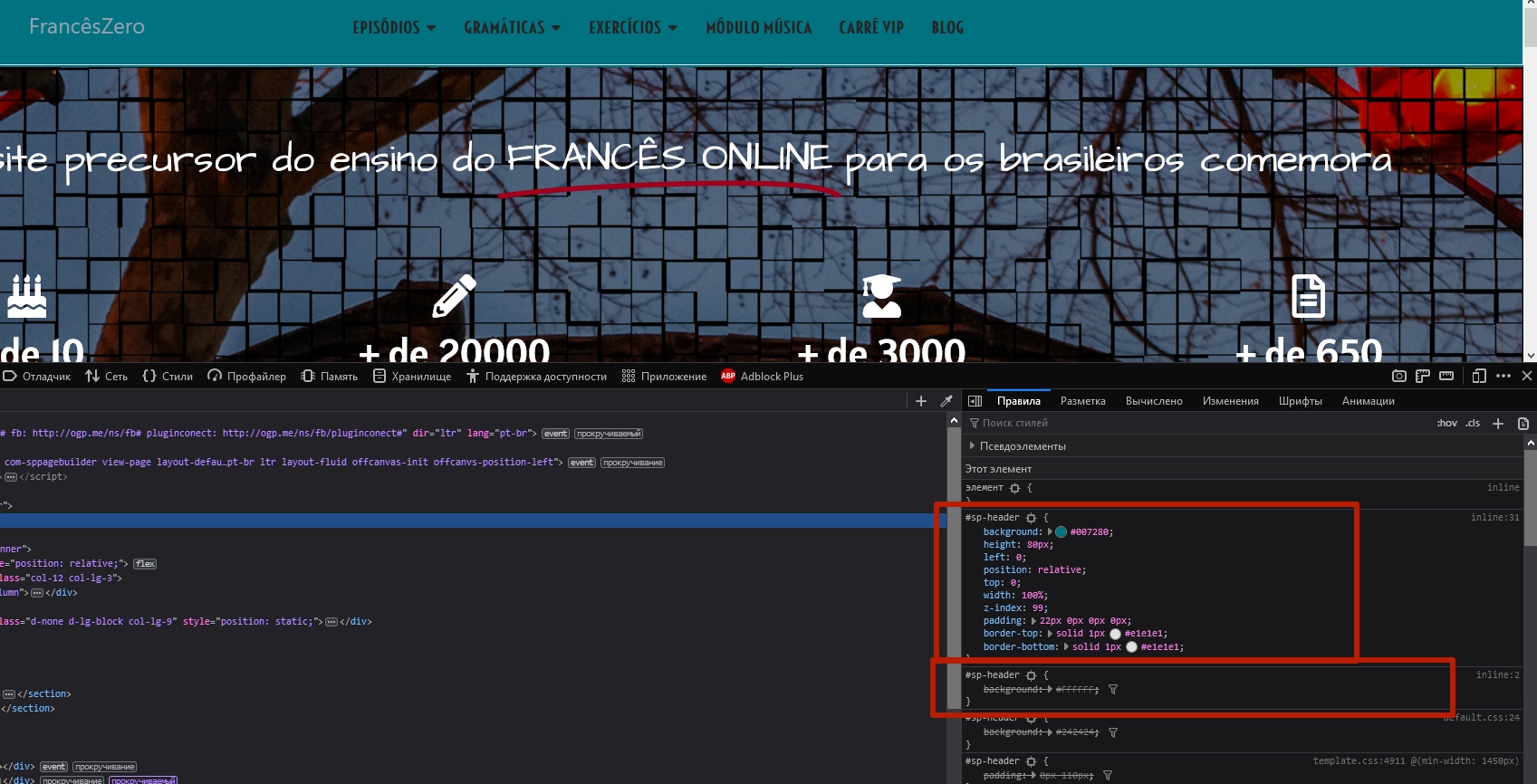
To increase the precedence, you can add !important after the value.

To avoid confusion, I recommend using only the custom.css file for your code. Using code in the template and page fields puts that code right on the page, which degrades speed and confuses, as in your case.
To change the Header color (or customize any other elements) on a separate page, add the page class in the menu item settings. Write your code using this class as a parent.
For example, if you add the my-own-page-style class to the page, the code looks like this:
.my-own-page-style #sp-header {
    background: #FFFFFF;
}
Another way, create a copy of the template style, apply it to the desired page, add a unique class for Header in the Layout Builder settings. For example my-own-header-style.
Then, the code will look like this:
#sp-header.my-own-header-style {
    background: #FFFFFF;
}Hi there!
Would you please tell me which pages you want different color?
Maybe I can provide CSS then. Unfortunately I can't see your screenshots...
Best Regards
just on ths page
https://www.franceszero.com.br/home-new.html
I don t know exaclty how to put o screen here but if you copy and past the url it work.
http://franceszero.com.br/images/screen/screen_1.png
http://franceszero.com.br/images/screen/screen_2.png
thanks
Hello,
Can I have a new response ?
Thank you !
Romaric
Hi. This is already white as you want. Or what's the problem?

Hello,
Right, at the moment you look it was withe. please look now, it still not work. ths css still does not affect the page :
Where is the css :
http://franceszero.com.br/images/screen/screen_1.png
The page is :
https://www.franceszero.com.br/home-new.html
Thank you
Thank you very much for this clear an detailed answer ! It helps me a lot.
Have a good day.
You are wellcome



