
I am using Innovate Template, I need to use the Top bar, but it's not there, can anyone please help me how to get the top bar in the header layout please?
Awaiting an answer
Templates
Innovate Template
Asked by Hanson
4 years ago
Last activity 4 years ago
8 replies
Hanson Asked this
is there any solution for this? can anyone help?

Paul Frankowski Senior Staff
Hi,
Let me check on my demo first.
Paul Frankowski Senior Staff
It's possible but not so easy as you may think.
- You have to disable Predefinded header
- Create custom "header" and "top-bar" rows with columns
- Use some custom CSS, I can share with you only basic example
- Publish modules in top1 and top2 positions

Paul Frankowski Senior Staff
ad 2) Custom Rows.
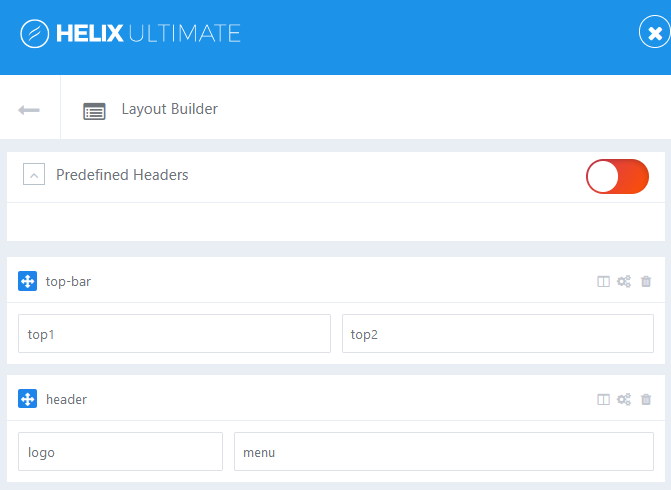
Ad 3) Custom CSS, this is only basic example, more if needed you have to add alone
#sp-top-bar {padding: 4px 0;}
#sp-header {top: 30px;}
#sp-header.header-sticky {top: 0;}
Paul Frankowski Senior Staff
But above method will help you to keep orginal buttons in the Menu row.
So maybe you should consider customization of this file:
templates\innovate\headers\default\header.php
instead of... but CSS will stay.
Hanson Asked this
Hi Paul, thank you for taking your time on this, yes, I know its not easy, for sure there will be some code modification to make this happen, it would be nice if you can give me a little guide on how to make this happen, step by step that would be awesome. Thank you and very much appreciation!
Paul Frankowski Senior Staff
If we talk about customization of:
templates\innovate\headers\default\header.php
DOWNLOAD, UNZIP and Replace orginal file---
header.zip
(then use custom CSS as well, from above)
You can publish any module in top1 and top2, but not default social icons or contact, sorry.
Hanson Asked this
Thank you, I will try, if need more help, I'll let you know. Thanks bro!
Log in to reply.