

Off-canvas Menu
GL
Grethe Lambrecht
lizakrugermeier.com Helix Ultimate on smartphone - off-canvas menu is very difficult to see. I would like to have the 3 black lines up in the white area besides the logo - as it is on computer
21 Answers
Order by
Oldest

Ariba
Accepted AnswerPlease check now. I have added the following css in custom css section
.logo-image-phone {
    height: 58px !important;
}Ariba
Accepted AnswerHello
Thank you for your query.
Please add the following css rules in custom css section
@media (max-width: 575px) {
    body.ltr #offcanvas-toggler.offcanvas-toggler-right {
        margin-left: 0px;
    }
    #sp-logo {
        padding:0px;
    }
    #sp-menu {
        padding: 0px;
    }
}
GL
Grethe Lambrecht
Accepted Answerhello I cannot see any change??? the 3 black lines are still on top of the slide images
Ariba
Accepted AnswerHello
Kindly replace the previous rules with these please:
@media (max-width: 575px) {
    body.ltr #offcanvas-toggler.offcanvas-toggler-right {
        margin-left: 0px;
    }
    #sp-logo {
        padding:0px !important;
    }
    #sp-menu {
        padding: 0px;
    }
}
GL
Grethe Lambrecht
Accepted Answerit's the same you sent me before??? I placed it - but it made no difference
Ariba
Accepted AnswerHello
Kindly add the following rule in custom css section
.logo-image-phone {
    height: 58px;
}
This will reduce the space that your logo image is currently occupying. At present, it does not leave any space for other components to sit beside.
Ariba
Accepted AnswerCould you provide me your administrative access, please? Use the hidden mode to share the log in credentials.
Ariba
Accepted AnswerYou are most welcome :)
Please do let me know if there is any other issue, I would be happy to help. If there is no other query, kindly accept the most useful answer that helped you in order to resolve and close the post.
GL
Grethe Lambrecht
Accepted AnswerI tried - but got this message Google authentication is unavailable at the moment. Please try again
GL
Grethe Lambrecht
Accepted AnswerAriba you made this yesterday: .logo-image-phone { height: 58px !important; }
but I cannot see it in custom.css which css did you insert it in??
Ariba
Accepted AnswerPlease check the screenshot below:
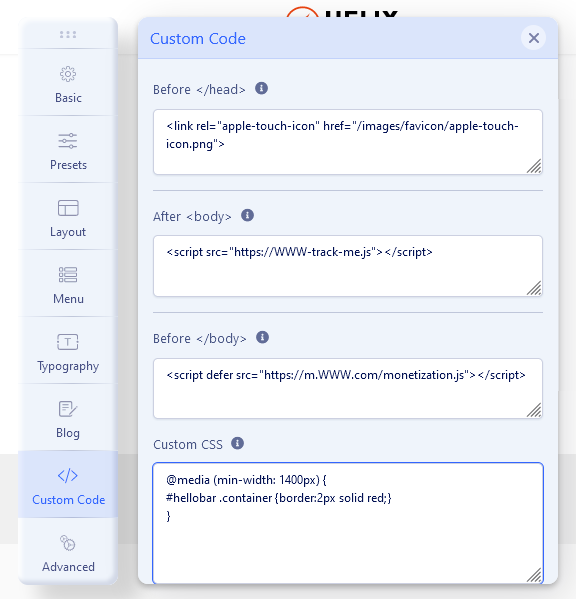
The css code has been added there.
https://www.joomshaper.com/documentation/helix-framework/helix-ultimate-2/custom-code-css-js-meta