

Bullets Not Showing After Update
S
scomil808
Hello! After a template and SP pagebuilder update, our bullets are not showing correctly. Please take a look at the link when you have a moment: https://wtmorris.org/index.php/departments/building-department/building-permits.html
7 Answers
Order by
Oldest

Paul Frankowski
Accepted AnswerHi,
Find Custom CSS where you defined ">" icon for < li >
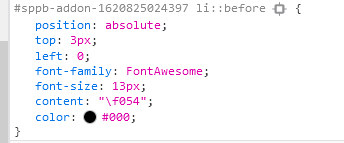
and make/add those two changes:
font-family: "Font Awesome 5 Free";

font-weight: 700;
Then it will work (!)
Paul Frankowski
Accepted AnswerNow you have to use Font Awesome 5, not FA 4.7 as it was before (!) this is the major change.
S
scomil808
Accepted AnswerThanks, Paul. I have those throughout the website - Any way to one shot this trick or do I have to go to each one?
Thanks, Scott
Paul Frankowski
Accepted AnswerFor right column tip, update to this code
#sp-right .sp-module ul > li::before {
  position: absolute;
  top: 5px;
  left: 6px;
  font-family: "Font Awesome 5 Free";
  font-size: 10px;
  content: "\f054";
  color: #000;
  font-weight: 700;
}
I have to go to each one?
Not always, but it was your idea to use this method instead of smart way since beginning. Below code may help....as general tip
 li::before {
  font-family: "Font Awesome 5 Free" !important;
  font-weight: 700 !important;}
S
scomil808
Accepted AnswerYeah Yeah... I know it was the wrong approach.
I really appreciate your help.
Thanks!
Paul Frankowski
Accepted AnswerYou're welcome.
You can also use DB Replacer tool from Regular Labs to remove "old" FA code line from all addons.