

Edit Page Displaying When Not Logged In!
T
Tony
Hi,
I'm using the latest versions of Helix Ultimate and PageBuilder. When I log out of the frontend, the Edit Page button still appears (regardless of what device or browser I'm using). I have cleared both my browser cache and Joomla cache. If you click on it it takes you to a login page, however visitors should not be able to see it all!
Help appreciated, I must launch the site in 2 days!!!
15 Answers
Order by
Oldest
T
Tony
Accepted AnswerHi team,
Is there any way to escalate this? I've been advised by Joomla support it's likely to be a template issue and that all my Joomla setting for the Public Group are in order.
The website needs to be launched in one days time and will be announced on Australia's biigest national radio network at that time!
I'm freaking out!!!

Paul Frankowski
Accepted AnswerHi Tony,
you have the lasted Helix Ultimate (RAW) so it's not a template issue, otherwise there would be crowd people on the forum saying that they have it too, right.
Thanks for access, I will check. Give me serveral minutes. I will Keep online.
T
Tony
Accepted AnswerMany, many thanks Paul.
I wasn't "finger pointing", just passing on what I've been advised. I love SP Pagebuilder, it has made my job so much easier, so would never wish to offend support! Any help you can provide to assist getting the issue corrected is greatly apprciated.
Best wishes, Tony
Paul Frankowski
Accepted Answer-
I removed "Edit" button for Guests using quick fix. But ping me on Wed. Till then I should know why you had it.
-
I customized you login area :) using Admin template settings.
-
I wish your website success in these troubled almost "Mad Max" times.
T
Tony
Accepted AnswerPaul, You Sir are a legend!!! Many, many thanks.
I'm still having trouble making my menu icon appear on a black backround! https://www.joomshaper.com/forum/question/12018#qa-answer-58231 Much as I've tried following the documentation, I'm not skilled enough to locate the file that designated the color!!!
Paul Frankowski
Accepted Answer[=] is white, but I noticed that icon is below the header in mobile view, so I have to check why.
Paul Frankowski
Accepted AnswerPlease tell me how you do it so I won't have to trouble you again :)
No black magic this time, sorry. For [=] color I used custom CSS, this same that I put in Helix documenation.
T
Tony
Accepted AnswerYou're still a genius... will ping you on Wednesday. I spent 3 days trying to fixed these issue. Tonight I will spleep well ahead of tomorrow's launch. Thank you so much :)
Paul Frankowski
Accepted Answer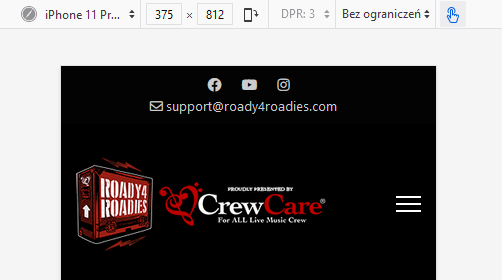
fixed, now logo and mobile menu icon is on this same line. But please remember to refresh browser 2x to see changes. for this I had to use magic trick, haha.
Paul Frankowski
Accepted AnswerYou Sir are a legend!
Tony, I hope I will not stay alone as hero of "I am a legend" movie. Being a survival instrultor can be a curse. ;)
Good night 4 You. Here we have 10:30 AM.