with Sp Page Builder installed - article contenct is no londer editable in wysiwyg - Forum | JoomShaper
Awaiting an answer SP Page Builder

with Sp Page Builder installed - article contenct is no londer editable in wysiwyg

Asked by Rita 4 years ago Last activity 4 years ago

Hi,
with SP Page Builder installed I am no longer able to edit Content Articles - even with basic Joomal3 editor.
On opening my already existing article I get a selector image JOOMLA EDITOR or SP PAGE BUILDER
with Joomla Editor selected as default and
the article content shows in Code version.
how can I get this content into Wysiwyg ? in order to edit as usual?
[Toggler Editor] is not staring.
I do not want to regenerate each article into a Feature Box - these articles are already set within the site menu.
I am using lt_stable template.

kind regards
Rita

4 replies

Paul Frankowski Senior Staff
4 years ago · edited

Hi Rita,

  1. SP Page Builder support only TinyMCE (default) and JCE (Core/Pro) so as first step check if one of those are set as default.
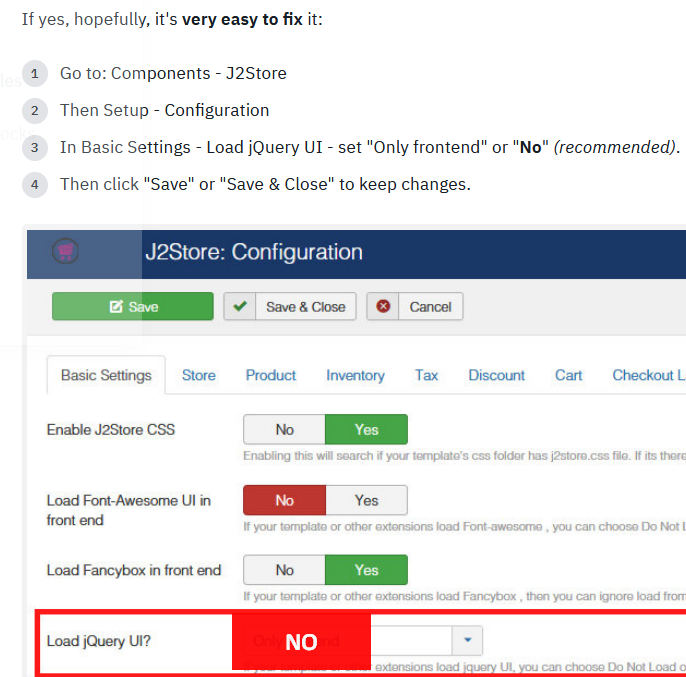
  2. If you have J2Store installed please read tip#5 from: https://www.joomshaper.com/documentation/helix-framework/helix-ultimate-2/troubleshooting-faq#i-cannot-edit-articles-anymore-buttons-are-not-active

foto_7902_2022.jpg

  1. Switch template to Joomla default one, not LT_Stable and check again.

In case of it's something else make a screenshot or video and share link to it.

Rita Asked this

Hi,
I had actually configured the site to be edited with TinyMCE - I do not have J2Store
and right now I have installed helix ultimate
so I have resolved my off canvas menu issue
but JOOMLA EDITOR on hitting [Toggler Editor] the system gets stuck

now I am on Helix Ultimate Framework 2.0.5

kind regards
Rita

Paul Frankowski Senior Staff

Maybe JCE would be better ;p

Rita Asked this

yes JCE editor is ok - but SP Page Builder does not agree with either.
Never mind - I will proceed as I did before without Page Builder - using just the framework
kind regards
Rita

Log in to reply.