File Download Button
OJ
Oliver Johnson
Is there a way with SP Page Builder to add a button that would allow the site visitor to download a file like a PDF document?
I've tried adding the path to the file to the button URL but when I preview the page and click on the button I get a 404. If I paste the path into my browser the PDF file loads so I know the path is correct. Ideally I'd like the file to download rather than be viewed in the browser but I'd settle for viewing if downloading wasn't possible.
4 Answers
Order by
Oldest

Rashida Rahman
Accepted AnswerHi there!
Thanks for your query. You have the following options:
- Button adddon
- You can install editor JCE Pro and use built-in file manager in every Text addon
- Download and install Phoca Download or similar and use module from it inside Module addon
May I know where did you keep your PDF file, please? You are supposed to keep it within the media of SP Page Builder and then you can choose the file from the button link field.
Best Regards
OJ
Oliver Johnson
Accepted AnswerAhh I think that's where I went wrong. I put it in the Joomla media folder. Will try again using the SP Page Builder media folder

Paul Frankowski
Accepted AnswerIf I may..
Button addon has this field and option to upload file(s)

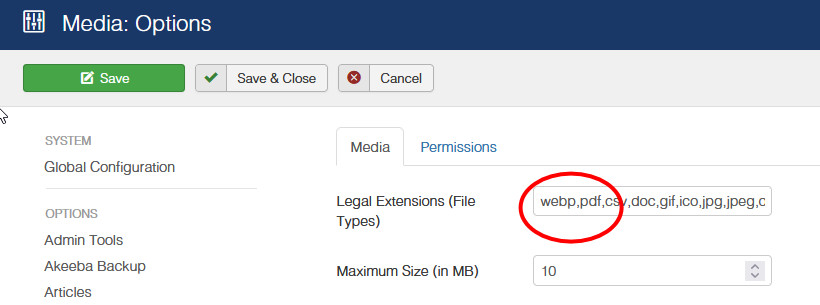
remember to add "pdf" in Joomla Media - Options as well