

Stilbro - Enable Policy Checkbox Doesn't Works
DB
Denis Bonetti
hello i can't see on the contact form the Policy Checkbox even if enabled on YES there is no way to show changing php version, creating new module...
https://www.tre60ceramiche.it/contatti.html
and also in homepage doesn't works any idea?
17 Answers
Order by
Oldest

Paul Frankowski
Accepted AnswerCaio Denis,
I have one theory.
please DELETE "ajax_contact" folder (if you have it) from:
templates\stilbro\sppagebuilder\addons\ajax_contact
elimina cartella
Paul Frankowski
Accepted AnswerThis is not Contact form , but Form builder addon.
And do you have this file?
templates\stilbro\sppagebuilder\addons\form_builder\site.php
If yes, delete it.
And make sure that you have installed SPPB Pro 3.8.6
DB
Denis Bonetti
Accepted AnswerNo templates\stilbro\sppagebuilder\addons\ ...
nothing inside
version is Version: 3.8.6 Pro SP Page Builder Database table structure is up to date.
nothing looks bad...
DB
Denis Bonetti
Accepted Answeroh sorry.. yes i mean Form builder addon.
by the way templates\stilbro\sppagebuilder\addons\form_builder\site.php doesn't exist the folder form_builder and nothing inside of course
Paul Frankowski
Accepted AnswerOk, found
inside form builder addon - Style - somebody(maybe you?) used:
label { display: none !important; }
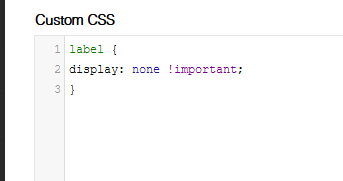
but it hidden all labels.
Paul Frankowski
Accepted AnswerIf you wanted to hide labels you have to hide only selected, not all.
Con l'invio della richiesta di contatto acconsento a che i dati personali da me forniti vengano....
Is label (!)
DB
Denis Bonetti
Accepted Answer... i didn't used this code.. i saw and i thought was there.
i'll ask tomorrow to my colleague
that was the problem?
SORRY PAUL
Paul Frankowski
Accepted AnswerUse this Custom CSS instead
.sppb-form-builder-field-2 > label,
.sppb-form-builder-field-3 > label  {display: none;}
I did already.
You own me pizza ;p
DB
Denis Bonetti
Accepted AnswerYou own me pizza ;p..
ok.. better try italian pizza here.. you welcome :-)