Text On Mobile does Not Wrap
D
daniel
Hello,
I have the problem that I have built pages with PageBuilder Pro (3.8.6) and they all look correct in the mobile preview. The texts are wrapped correctly and the pictures are also correct. Only when I then look at the pages on the right mobile phone are the texts no longer wrapped and then run outside the visible area. I've thought of everything but couldn't find a solution...
Thank you for your time. - Greetings - Daniel
Website
https://appartement-huber.de
6 Answers
Order by
Oldest

Paul Frankowski
Accepted AnswerHi Daniel,
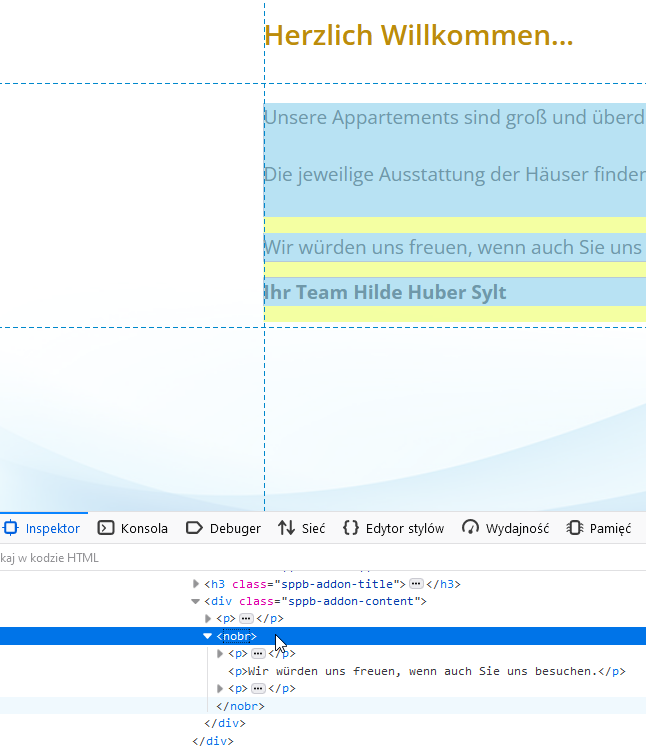
To be honest it's site webmaster fault, please check Text addon content in HTML mode - there you have
<nobr>

</nobr>
it makes this problem, please remove from it. It wasn't added by Us !!!
More info: https://www.w3docs.com/learn-html/html-nobr-tag.html as you can read there - it's not recommended anymore.
D
daniel
Accepted AnswerSorry, but there is no NoBreak tag in the opening text. But I had stored break tags. This is how it looks at the moment: <p> </p> <p>Our apartments are large and furnished above average. You will want for nothing in our 4-star hotels. <br /><br />The respective equipment of the houses can be found under the buttons on the left. Pets are welcome in some objects. <br /><br /></p> <p>We would be happy if you visit us.</p>
Paul Frankowski
Accepted AnswerI told you what I saw on the homepage, below is screenshot from browser Code Inspector. So please check deeper ones again.