

Mobile Menu Not Correct

MoneyPeet
Hi,
I am using Helix Ultimate (2.0.8), and I am having one small issue with the mobile menu. Please see the picture below. Can someone please help me with this?
Website: https://www.huntingtonzaanstreek.nl/
Regards, Peter

6 Answers
Order by
Oldest

Mehtaz Afsana Borsha
Accepted AnswerHi
Use this custom CSS
@media (max-width: 576px){
.logo-image {
    height: 25px !important;
}
}
Path towards custom CSS: Extensions>Templates>Styles> Click on your current default template name then choose Template Options. Then find custom CSS within the custom code.
Mehtaz Afsana Borsha
Accepted AnswerHi
Thanks for contacting us. I will check and get back to you soon.
-Regards.
MoneyPeet
Accepted AnswerHi Mehtaz,
great! Please let me know if you need login credentials.
Regards, Peter
MoneyPeet
Accepted AnswerHi.
I have added the css, this decreases the size of the logo. But the mobile menu is still in the same place.
Regards, Peter
Mehtaz Afsana Borsha
Accepted AnswerBut it seems ok on my end
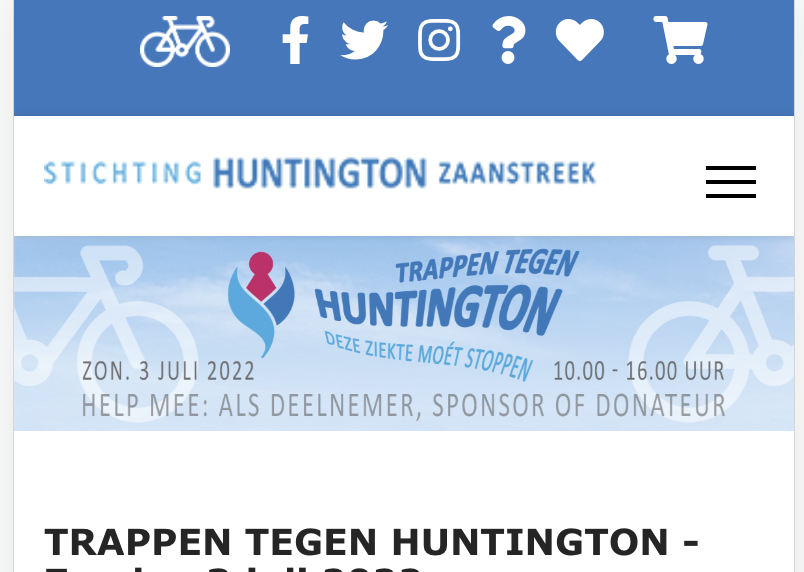
By the way in this resolution you have to decrease the logo size otherwise menu does not fit there.