

Where are Typography Settings Stored
S
SPD
Hi, I want to have the same font styles throught the website, in SP PB Add-ons and Joomla Content editors, so I was going to use a Custom.css file. My though was to create the H1-H6 styles I want using Template Settings > Typorgraphy and then copy those classes into a custom.css. Two questions
- Would that work
- Where are the SP PB Pro Typography Settings stored
This image shows the different between the SP PB H1-H6 and Joomla Content Editor https://drive.google.com/file/d/1kO8qxiw5hVZvMTxaT_yN5rOPgXjKp9Ut/view?usp=sharing Thank you
21 Answers
Order by
Oldest

Paul Frankowski
Accepted AnswerHi SPD,
About TinyMCE - Plugins: Editor - TinyMCE
- Template CSS Classes: OFF
- Custom CSS Classes: templates/shaper_helixultimate/css/custom.css

It will help if you customized all font design inside custom.css file. I mean H1-h6 etc.
About JCE editor it has option to use (also for preview) styles from your template.
Editor Global Configuration > Template CSS file - then it will use (template.css) of your Joomla! template Or if you customized font design inside custom.css - then you should choose "Custom CSS Files" in select field, and put name as I did at below screenshot. You can even use two files with comma between.
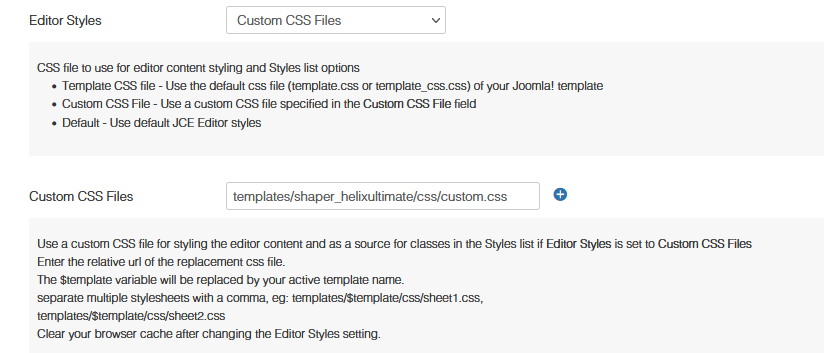
Above tips should help for most Textarea fields used in Articles, Modules and probably Text addon as well. Of course first you have to define apperance of H1-H6 inside custom.css - font-size, font-weight, font-family etc. Easy peasy.

Toufiq
Accepted AnswerHi there,
Thanks for contacting us. Sorry for the inconvenience. Please read the documentation of the Helix Ultimate typography section. I hope you will understand how it works exactly. Besides. The Page Builder doesn't have a global typography option. But, you can change your typography from your addon settings for the individual.
https://www.joomshaper.com/documentation/helix-framework/helix-ultimate-2/typography
-Thanks
S
SPD
Accepted AnswerThanks, I had found and used the Typography section of Template Settings, my question was where is that information stored. I assume its a CSS somewhere or is it in the database? I am asking becuase I want to make Global Font settings, I want H1 to be H1 however I display it on my site and therefore have decided to use a custom.css file. I just wanted to know where they're stored so I can copy-paste from there into my custom.css Cheers
S
SPD
Accepted AnswerNever mind (a Duh moment), just realised I could use Inspect in Chrome and find them and since they are showing in <style> in the page I assume they're being stored in the database somewhere
Sorry for the bother
S
SPD
Accepted AnswerAh, since I had found it in the web page in the Header like so... <style> h2{font-family: 'Noto Sans', sans-serif;font-weight: 700;text-decoration: none;}</style> ... that it was added as part of a process as opposed to being taken from a CSS file.
Again I know nothing about this stuff, just curious, which CSS file is it?
S
SPD
Accepted AnswerI have shared my site link below, if you check the <header></header> with Inspect or whatever, towards bottom are a series of <Style> tags which contain the setting from Typography. I verified this by changing H1 to waterfall
while I'm here just to check. Can I assume with this info that the CSS heirarchy would be Joomla > Bootstrap > Helix > Custom.css > typography > Template Settings - Custom Code ? Cheers
Toufiq
Accepted AnswerPlease check the screenshot.
https://drive.google.com/file/d/1A5ez1KuPg2QmO1HxaK8ZwOBL8iUdAY2w/view
S
SPD
Accepted AnswerSo, some confusion here. Original question was I wanted to know where the Typographical settings, from Template Settings, where stored.
I wanted that information so I could create a Custom.css and copy that information into it so that ALL my H1-H6 settings where the same, whether I used a SP PG Pro Page/Add-on/Default Joomla Article or Module, unless I overwrote them in the specific item.
So, if I may, let me get back to my original problem. What is the best solution for me to have ALL H1-H6 and Body typography settings the same throughout my whole website - unless I specifically overwrite them. Thanks again for your help
Toufiq
Accepted AnswerIf you set h1 to h6 from template manager then it will globally. But, if you use page builder any heading content then you have to assign your heading from the page builder settings which you need.
S
SPD
Accepted AnswerThat is not what I am seeing unless I am misunderstanding how things work. This image is an Article I created with SPPB, as you can see I have 6 heading add-ons and I have use the drop down to select the H1-H6. I have not changed anything else At the bottom is a Text Block. In that I added 6 lines of text and select H1-H6 in the Styles dropdown https://drive.google.com/file/d/1It2CWdzJrXPb0R0kxRe_cXY7lFP_KxCG/view?usp=sharing
My expectation is that H1 in Heading Add-on is the same as H1 in Styles in a Text Block and basically everywhere throughout my website. If I need to do something else to make that happen please let me know, my simple mind an't keep track of what H1-H6/Body Style is used where :-) Cheers
Toufiq
Accepted AnswerYou can create a custom.css file inside the css folder and write down css code like this.
h1,h2,h3,h4,h5,h6 {
    margin-top: 0;
    margin-bottom: .5rem;
    font-weight: 500;
    line-height: 1.2
}

h1{
    font-size:32px;
}
h2{
font-size: 26px;
}

h3{
font-size: 18px;
}

h4{
font-size: 16px;
}

h5{
font-size: 14px;
}

h6{
font-size: 12px;
}
S
SPD
Accepted AnswerOk, just to make sure I understand . You are agreeing that using Template Settings > Typography is NOT global and that I need a custom.css?
So I tried that, I have a a custom.css which I know if being access as I can see it in the header and also I can see change in pages. I added the following, which is fromthe <style></style> in the page which is comming from the Typography Setting
h1{font-family: 'Waterfall', sans-serif;font-weight: 700;text-decoration: none;}
I did not see any changes I used the Inspect option and this is the Line I saw
<p class="h1">Default Article - H1 Style</p>
Which actually says it is getting the Font-Family from my Body Typography setting if you follow the Inspect stuff.
So does that mean I have to do things differently. Any guidance you can offer would be greatly appreciated
Toufiq
Accepted AnswerWill you please provide me the Joomla administrator access to check the issue?
Toufiq
Accepted AnswerI just checked h1 font size and it works fine in your typography test page.
S
SPD
Accepted AnswerOnce again a misunderstanding, I never said Typography wasn't working. I think this ticket is just getting to confusing so I will start another with my main objective which is to make sure that H1-H6 and Body is the same throughout website no matter where i use it <H1> - <H6>
As you can see in the link that is not the case
Thanks for your time
S
SPD
Accepted AnswerThanks Mr Frankowski, Again you tell me something I didn't know re: the editors. I am just now using JCE as I read about it (a dangerous thing). I read more on JCE to make sure its using my custom.css settings. I also did notice that the Search results and stuff seemed to be using different typography but I will track that down. Thanks to you both for your patience, I won't need to start another another post.