

Themis - Can Not Where To Remove This Text?
M
Michael
Hi guys,
On the Themis Template, on your 'DEMO site' the word "IMAGE" comes up under the 'image' at the top of the page on the 'ABOUT' page... and I have this happening as well on the Template I downloaded. On your DEMO website, go to the Themis Template - main menu an navigate to: Pages/About ... and under the 'newspaper image' ... you see the word - 'IMAGE'
I have checked in SPPB on my site template that I downloaded and it is there as well ... and I can not find where you can REMOVE this, as I have noth in the 'alt image' text... or 'image text'... they are both blank?
<img class="sppb-img-responsive" src="/R8Cye6buUzT/" **alt="Image"** title="">Look forward to learning how to remove this.
Cheers,
Michael
10 Answers
Order by
Oldest

Paul Frankowski
Accepted AnswerIdea #2:
In 2nd image addon use below image (or transparency image 1 x 1 px) and in "ALT Title" put empty space

As you see there is always more than one solution to solve any "problem". But do not ask me why our developer used this crazy method to put circle bg behind image ;]
Paul Frankowski
Accepted AnswerHi Mike,
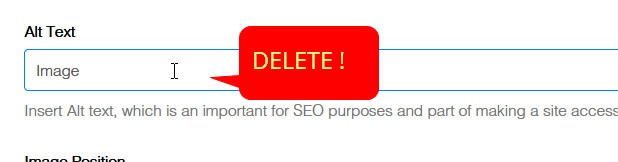
It looks like from Image addon "ALT" content. Open that page in SPPB editor and check all image addons in the first Row (Section) then if you will find - check it "ALT Text" field and remove word "Image" and image URL from it, Save changes.
M
Michael
Accepted AnswerHi Paul,
I have already checked that... there are 2x image addons on the left side in that first row. The first image on your DEMO site is a 'newspaper,' and on my site a 'face'. I disabled this 1st addon... and the word 'image' remained.
Then there is a second image addon, under it... which is for the background circle... but when you look in this addon... there is NO IMAGE used (or selected). It must be some CSS from the template.
If I turn off the second image addon (which is the background circle), the word 'image' disappears, but when turned ON, there is no field inside the addon - to add or remove 'ALT text".. as there is no image selected !
So your suggestion doesn't help unfortunately, that's why I shared that you DEMO site has the same issue.
Thanks for the reply though.
Cheers,
Michael
Paul Frankowski
Accepted AnswerOk, I know. I checked my own demo site.
Idea #1: It request two steps:
- Disable 2nd Image addon
- In first image addon : Style (tab) - Custom CSS (at the end) put below:
#addonWrapper {
  background: rgba(20, 23, 30, 0.3);
  border-radius:100%;
}
M
Michael
Accepted AnswerHi Paul,
Tried Idea #1 I tried your first suggestion, turning off on the 2nd addon ... and then added the CSS at the botton of the 1st image addon ... but this did not work, ... as the BG Blue Circle... was not there anymore... but obviously the word 'image' disappeared?
Should the Blue background circle be 'present' -using the
#addonWrapper {
  background: rgba(20, 23, 30, 0.3);
  border-radius:100%;
}
????
M
Michael
Accepted AnswerHi Paul,
I tried the 2nd Idea... that seems to have worked, but I think there was an animation that may have now disappeared of the image ' face ' rolling in from the top right corner... ?
Anyway... that should OK..
Thanks for the Idea2 ... that helped !
Paul Frankowski
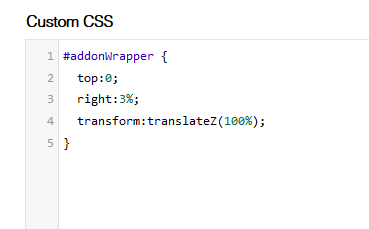
Accepted AnswerI used both and worked. Anyway, with #2 - animation should be still - if you didn't delete orginal 2nd Image addon, the animation was added using front-end editor and with extra CSS inside it (below)
M
Michael
Accepted AnswerYes, for some reason that CSS was missing in the 2nd Addon, but I didn't delete it in the addon... or touch the CSS... at any stage.
I've placed it back in 2nd ... but it still doesn't do anything. Did it need to be in the first?
Otherwise... all good... I'll guess I'll just give it a miss. :)
Thanks !
Cheers,
Michael