

SP Builder 4 -> How To Change Language Of A Page
MV
Marc Vogt
With the new version of SP Builder, I do not know where I have to click to give a page a language.
It was really better done before.
Can you help, thanks.
Best Marc
8 Answers
Order by
Oldest
G
George
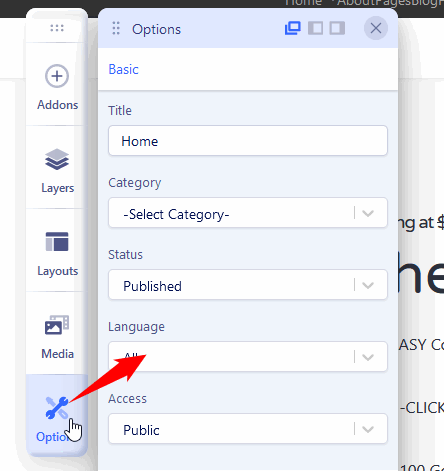
Accepted AnswerHi, I also had the same problem but I find out that in back end on the left side if you click on the third buton from the top a menu opens from where you can check the language. I hope this will help.
MV
Marc Vogt
Accepted AnswerThanks for your reply, but this options is not working on my SP Builder. I have nothing, just a blank menu. here a video: https://watch.screencastify.com/v/dFNaLHw9fSCwUtJqRJOf
When I ckick on save, I have an error message telling me "No ID provided", I have put my licence key, but not working.
I have a Mac IOS 11.6.6. Tried with Brave/Chrome, same problem. Options do not give a menu.
What can I do?
Best Marc

Paul Frankowski
Accepted Answer- Video Access Denied - I cannot see it. Share link to screenshot at least.
- Do you really have to use SPPB 4.0.1 right now? Maybe it's better to wait for next update 4.0.2 at least, less worries.
MV
Marc Vogt
Accepted Answer- if your editing system was better elaborated I could have send you a picture.
- you are the one promoting SPPB 4.0.1 not me, so check the bug before. Now, I have to downgrade it on my website. More work for and you didn't give me a clear respond to my problem. Where do I find the ID?
- You take hours to respond to request to problem to solve, I have two pending and still have no answers. It is innaceptable.
Regards Marc
Paul Frankowski
Accepted Answer- But you can always use your own server to share a video, image etc.
- A simple question: have you used Joomla 4.0.1 on your production site right after publishing? If yes, you have to be a brave man.
ID of what?
MV
Marc Vogt
Accepted Answer-
Here again a link to the video, this should work, in it you have my question regarding the ID: https://watch.screencastify.com/v/aShVW6eTvVWHjsSe4TvM You will see that the option menu is empty and when I try to save, I have an error ID message.
-
Sorry I do not understand, I have installed joomla 4.1.5 on my prototyp.in-finitude.ch and SP builder 3.8.8 and then I have upgrading SP Builder to 4.0.1. I do not work with my main website.