

Text Editor is Too Small
O
Ola
Hi!
I am not sure if it is a bug? The text editor is way to small to edit text from frontend - it is very hard to use.
I need more option so I (for example) can insert shortcodes from AMPZ (https://docs.roosterz.nl/ampz/shortcodes).
Where do I expand the editor so it is usable? Removing editor from backend is a big mistake I think.
I found no option to attach screenshot here so hopefully you understand what I mean.
Kind regards Ola
10 Answers
Order by
Oldest

Paul Frankowski
Accepted AnswerThanks,
For SpPB 3.x I had shortcode addon if you want to try, in 99% cases it works
after unzip, use FTP and upload folder here
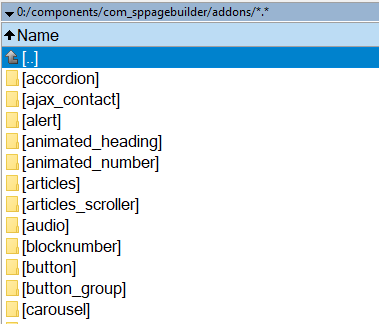
then just find it on the list and use shortcode text inside.
Paul Frankowski
Accepted AnswerHi Ola,
About shortcodes they were never been suported in SPPB, not in 2.x, 3.x and even now in 4.x.
More about how to use Shortcodes read TIP 10. from 3.x method still should work in SPPB 4.x https://www.joomshaper.com/documentation/sp-page-builder/sp-page-builder-3/how-to-tips
SPPB 3.8.x will be supported for next two years, so you can keep that older version if you want to have also back-end editor. Front-end editor of SPPB 4.x will be improved in next updates.
Paul Frankowski
Accepted AnswerThe text editor is way to small to edit text from frontend
On the forum you can find topic with CSS hacks how to increase size of it. But yes, it should be improved by next updates.
O
Ola
Accepted AnswerHi Paul!
Thanks for quick answer.
I like the new interface but guess I need to downgrade until the editor is fixed. Hopefully it is prioritized.
I also think you should add the possibility to add shortcodes in next releases.
Keep up the good work! Ola
Paul Frankowski
Accepted AnswerWhere do I expand the editor so it is usable?
If we talk about SPPB 4 and Text addons width - this should CSS help
@media (min-width: 780px) {
.builder-inline-editor-item.builder-inline-editor-has-child :is(.builder-inline-editor-dropdown,.builder-inline-editor-button-content,.builder-inline-editor-button-options)
{ min-width: 720px; width: 720px !important;}
}
S
Schwyzer
Accepted AnswerHi Paul, I tried your CSS....but it didn't help me... We have to wait for your update... Its ok for me.. Thanks Paul
Paul Frankowski
Accepted Answer@media (min-width: 780px) {
.builder-inline-editor-item.builder-inline-editor-has-child :is(.builder-inline-editor-dropdown,
.builder-inline-editor-button-content, .builder-inline-editor-button-options)
{ min-width: 720px; width: 720px !important; max-width: 100%;}
}But indeed in editor area that code is not used if CSS was used in custom.css, so you have to add it inside file: components/com_sppagebuilder/assets/css/editor.css at the bottom!