

Template Big Bug
S
shahbaz-aslam
hello,
recently i have purchase a template and foundout that it has a bug.. intried to put my company logo on front page but its no showing at all. i reached support to help in this, they provide me a way to do that. i did try but with failed. however i found by myself that putting the logo on default path with same name will work... now i am stuck in fixing its size, which i dont know from where i can do this
location of site https://infinity.sa/iice.com.sa
16 Answers
Order by
Oldest

Mehtaz Afsana Borsha
Accepted AnswerHi, You can change the logo height Use this custom css
.logo-image {
    height: auto !important;
}
In Extensions>Template> Template Options > Custom Code > Custom CSS please add this Thanks

Paul Frankowski
Accepted AnswerI see your website logo. Firefox/Windows.
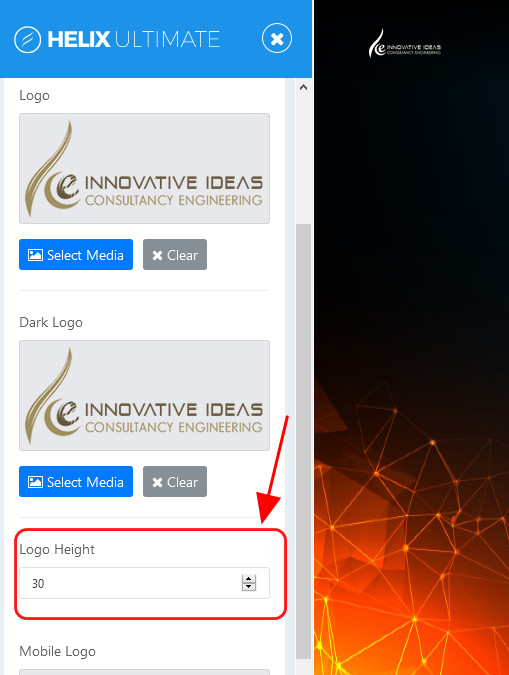
Now just change height of logo inside template settings, now it has 30px only.

Paul Frankowski
Accepted AnswerBTW I also noticed that you are using sort of pagespeed scripts, in some browsers they may damage images.
This kid of features should be enabled AFTER the website is complete not before.
S
shahbaz-aslam
Accepted Answerdid the hight change setting too but no luck.. pagespeed script is builtin with this template... what shoud I do to remove/disable it?
Paul Frankowski
Accepted Answer- Do you see logo now?
- What browser you have, please check on two different ones.
- About "pagespeed script" I am not so sure. I installed that demo few times, and was without it. So must be from your server settinsg probably.
S
shahbaz-aslam
Accepted Answer- I can see my logo, but not in correct size as its showing in other pages
- tried with firefox, chrome and edge.. same results
- pagespeed scirpt is only for speeding up the page right? what this has to do with sizing settings?
Paul Frankowski
Accepted AnswerUse Hidden Content field (below) and share access to admin area, I will make a logo bigger and share screenshot where I did it.
Paul Frankowski
Accepted AnswerPlease check login details. I see only this
Warning Username and password do not match or you do not have an account yet.
S
shahbaz-aslam
Accepted AnswerHow you have fixed it? I tried this many time but with no luck.. ? now I have reduced the size back to 30 still the size is showing 70...??
Paul Frankowski
Accepted AnswerYou have two template styles - you have to change in both: Wimble - Transparent and Wimble - Default.
Basic human mistake. Template is OK.