

SVG-Logo With Dylan V2.0.0 And Joomla 4 Not Working
C
Christian Löbert
Hi, i just updated my website to dylan v2.0.0 and joomla 4. I had two svg-logos in dylan with joomla 3 working but in joomla 4 they are not visible. I can see it in the dylan-Settings but not in the Frontend. I set the MIME-Type Settings and added "svg" to allowed Picture Types. Is there something i missed to configure?
Thank you
Website
https://www.carbeauty-studio.de
6 Answers
Order by
Oldest

Paul Frankowski
Accepted AnswerHi Christian,
I checked your site, and .svg image you have already set for MOBILE logo.
Can you do that also for Desktop? If not, without my help you can do that using DB Replacer extension
LEFT COLUMN: Table > Template_styles and Params
RIGHT: Search > logo_carbeauty_logo_weiss_h60.png
In field "Replace" put .svg file name > Search >> Replace
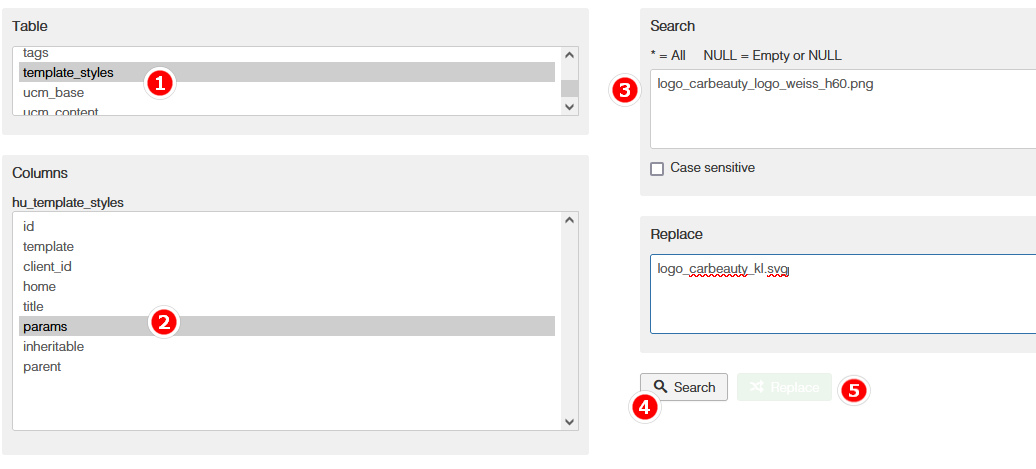
90sec task
C
Christian Löbert
Accepted AnswerThank you Paul, i already figured out what the problem was: The Pagebuilder Image Carousel was part of the problem - after disabling the Image Carousel, the svg-logo was back again. I made a new Image Carousel and now it works. Probably it was kind of a misconfiguration in the Carousel, because i had to try a lot of settings before it was treating the aspect ratios of the pictures quite acceptable.
Is there a way to lock picture aspect ratios in Image Carousel? Feels like every time you change the viewport (e.g. to mobile), the aspect is wrong again.
Thank you for your help!
Paul Frankowski
Accepted AnswerI didn't know that Image Carousel settings may cause such a problems, weird.
What version of SPPB you are using?
C
Christian Löbert
Accepted Answeryesterday i updated from Joomla 3.10.11 and the latest SPPB 3.88.something to Joomla 4 and SPPB 4.0.5 with Dylan Template v2.0.0. Probably there was a problem during the update with my homepage - as said, after deleting Image Carousel and recreating it, it worked. For now, i kicked out Image Carousel because of the aspect ratio problems and use the standard "Karusell" (German) for the Slideshow, wich is working fine in all viewports.
Thanks for your super fast response!
Paul Frankowski
Accepted AnswerChristian, but if you don't want to pay 170 euro fine from DE court, please remove Google Fonts loaded from US server.
https://www.joomshaper.com/documentation/sp-page-builder/sp-page-builder-3/google-fonts-and-dsgvo
BTW
Can you check me on DE www how that fine price was count in DE? why is around 170 euro, not 100 or 270 euro etc.
C
Christian Löbert
Accepted AnswerHi Paul,
my Cookie Consent Plugin allows you to reject, in this case Google Fonts are not loaded. But you are right, to be really sure, i will go for a local way using fonts. Thanks for reminding me.
I also got mail from german lawers, but in my opinion, they try to collect money from people who are scared... I don't believe they take the risk going into court, they just want to collect the easy money...
Thank you for your help!