I have an image to show and I don't know why it stopped showing
Solved
Templates
does not show background image
Accepted answer
Marked as the solution
Paul Frankowski Senior Staff
3 years ago
· edited
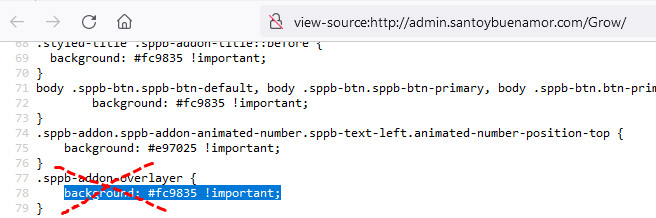
Inside those addons in "Style" tab > Custom CSS area search this code
.sppb-addon-overlayer {
  background: #fc9835 !important;
}
Search also inside "Home" page > in Custom CSS area
and
search inside template options > Custom CSS
if you will find it, DELETE.
5 more replies
fabiana Asked this
.styled-title .sppb-addon-title::before {
background: #fc9835 !important;
}
When I wanted to change the color of the buttons, I took this too, that's why it didn't show me the image now, how do I change the color of the buttons for this #fc9835
Paul Frankowski Senior Staff
3 years ago
· edited
Hi Fabiana,
to disable bg image click red [x] to remove image, then save settings and clear cache!
where I sould look? To see that addon ???
Paul Frankowski Senior Staff
Besides, bg images you should add for Row (Sections) not Header addons, in most cases it doesn't make sense, easy to forget or mess design.
Paul Frankowski Senior Staff
For example here, add bg image for Row. If you really want to have there a picture in the background.

fabiana Asked this
https://prnt.sc/ncOo_6ZVrrV3
I delete that code and I see it in preset but in the template admin.santoybuenamor.com/Grow no
Log in to reply.