Page Not Found after updated joomla 4.2.7 - Forum | JoomShaper
Staff replied SP Page Builder

Page Not Found after updated joomla 4.2.7

Asked by INAYATHULLAH SYED 3 years ago Last activity 3 years ago

hello Team,
This is my second post, i have not getting any answer from you.

i have used your helix ultimate framework and sp pagebuilder pro in my site now i have updated joomla 4 but my frontend missing. getting Page Not Found error. sppagebuilder is working fine but i think template has problem. if i update SPPB 4 then that also not working.

9 replies

Paul Frankowski Senior Staff
3 years ago · edited

Hi,

Sorry to heard that. I need access to admin area as Super User + URL.

BTW

  1. What is full name of template?
  2. What SPPB version you had orginally, two days ago?
  3. Check .htaccess file - you can rename it for test period.
INAYATHULLAH SYED Asked this

please check details

Paul Frankowski Senior Staff
3 years ago · edited

I think template is not a problem but FaLang component or old plugin from J3.

Paul Frankowski Senior Staff

It may take a while to find a reason...

INAYATHULLAH SYED Asked this

falang has no issue i have installed your letest helix template and assigned to page it's working but older helix template was not working. yes sure i will be waiting. please let me know if you found an issue. you can check with assigned your letest helix template.

INAYATHULLAH SYED Asked this

hello Paul Frankowski now both template has issue. yeasterday leteste helix template was worked and only old template was not worked but now both has issue. have you done anything?

Paul Frankowski Senior Staff
3 years ago · edited

I see that site with Helix is working...

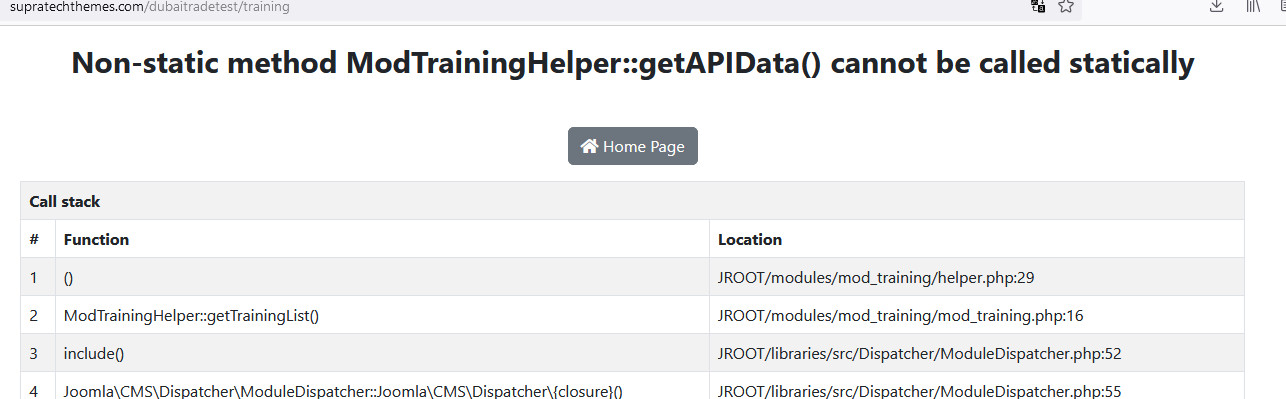
But you have tons of errors from old J3 extensions: like K2, Trainings that are not Joomla 4 ready.

I think you should hire somebody for that Joomla upgrade ... it's a lots of job that should be done to clean and fix everything. This is task for few hours!.

INAYATHULLAH SYED Asked this
3 years ago · edited

Hello,

my admin is again broken what you done yeasterday it was working fine. please revert back if you done anything.

Paul Frankowski Senior Staff
3 years ago · edited

You have backup - I don't have. Yesterdsay I only preview site, nothing was changed by me.

I told you you have to hire somebody to fix your website. I think you should start with upgrade again, but this time first uninstall/replace all old extensions etc.
Time and skills cost, living in Dubai you know it perfectly well.

Many old code must be fixed, example (preview front-end)
info_364_2023.jpg

Log in to reply.