How can I get around this super annoying thing ?
At times the floating menu tool is completely on the way and I cannot enter the data/text.
See example in the image below. I need to enter some text where the red arrow points out, but this stubborn menu keeps covering it (no matter how I scroll the page).
Staff replied
SP Page Builder
This is super annoying
4 replies
Arthur Asked this
Can somebody at least confirm that THIS IS A BUG ?
It makes operating on tables super hard (almost impossible). This floating tool needs some padding or margin around so it pops up away from the table edited field !

Paul Frankowski Senior Staff
Hi Arthur.
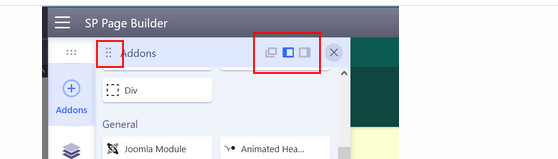
do you know that you can:
- Move that addon list (grab and move)
- Use that switcher
Arthur Asked this
I am sorry I should have posted a screenshot. I was talking about the little tool which pop-up when I want to edit a table placed on the page. This tools is often on the way (exactly covering the field where I need to enter data). It is not movable. Sometimes it helps to scroll up/down but in most cases it prevents me from typing!
I am talking about plain HTML (rows x columns) table placed on the page,...
BTW. I want the toolbox to behave quite opposite. I would like to see a PIN which I can make it glued permanently to the side of the page and this thing keeps moving around at times (even if I select the stay on the left).
Paul Frankowski Senior Staff
Please record video + upload somewhere (yt, or your server) and then share link to it - it will help our developers understand the problem.
You probably know the saying that a picture is worth a thousand words.
Log in to reply.