Hi, how do I get a full row in two color background in SPPB3?
See image.
Hi, how do I get a full row in two color background in SPPB3?
See image.
Hi Robert,
there are few ways to do that,
I would try with bg gradient settings with two colors. Using this same method to get that button

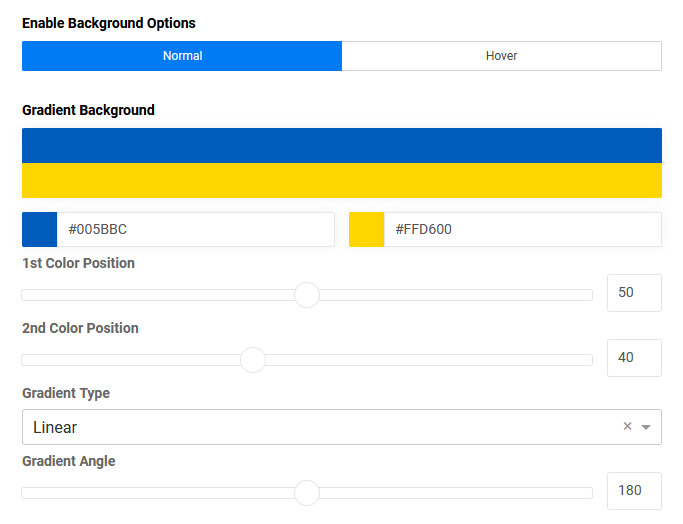
Just change value of Angle from 180 to 90.
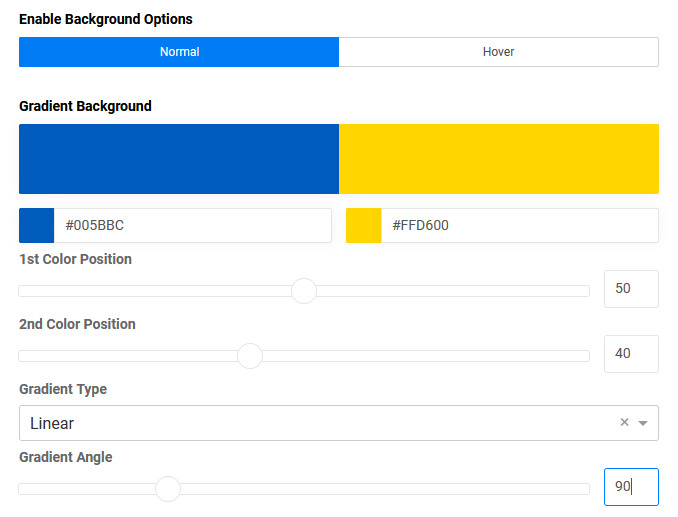
And different colors ;)
Hi paul,
I see, but on mobile I got vertical background then.
Desktop:
https://prnt.sc/O8XrfbFmJJQE
Mobile:
https://prnt.sc/b4GfzfeiVYp6
so think as home painter:
If your row has two columns: set bg grey to fist one and bg red to second one, no need to combine.

Just remember to set full width with container inside.
I gave you only one example how it can be done if you need something beyond the classic, as we can say "art for art's sake".
Full width goes only in the the row itselve. Not in the columns. Doing so the content goes also full width. Tried that.
class name: container - you can use it inside, for example, columns class or row class.
besides there is something named: nested row (row in the row) >> https://youtu.be/tqpjj0a5lbc?t=300
that you can can use for whole 1 column inside row, then two columns inside etc.
https://www.joomshaper.com/documentation/sp-page-builder/sp-page-builder-backend-editor/add-nested-row
Anyway, watch Video tutorials of that guy. In case of I can create video for my own channel.
Dunno what I did is exactly what you ment for sure but the inner rows gave me more flexability related to this.
Margins and padding I can manage per device.
I hope you noticed that you can change padding/margin for mobile view using icon [mobile, tablet] and different value.
So I guess, task solved.
Yes, I know.
Thanks for the hints into the right direction Paul! Much appreciated.
