Awaiting an answer Templates

Menu and Logo

Asked by Alvaro Fernandez 3 years ago Last activity 3 years ago

Hi,

I am using Artion template.

  1. Menu Issue
    When we go to the Mega Menu on the side.
    On Desktop everything is ok.
    On Mobile
    The sub options, we only see 2021 options, 2022 cannot be accessed.

  2. How can we fix the Logo in All Pages except home page.
    So moving Logo only on Home page.
    But then the next pages take inherent and wont show logo.
    Unless it is via Menu option.

  3. Where is the API Key for Mailchimp?
    How do we get rid of the message in footer?

      Thanks
    
      Alvaro

3 replies

Rashida Rahman Staff

Hi there!

Thanks for your query.

If you want different page differently, then you can duplicate your template style and assign your desired pages to different template styles with the help of the menu assignment.

Can I have your admin access to check, please?

Best Regards

Paul Frankowski Senior Staff
3 years ago · edited

If I may...

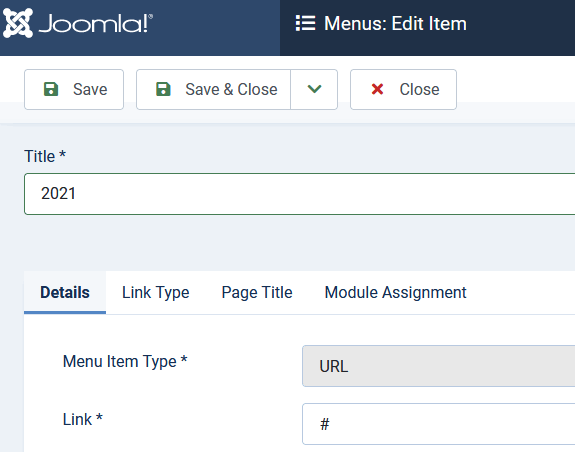
  1. Change menu itme type for "2022" it must be URL, not Header!
  2. Only via Custom CSS.
  3. On Mailchimp website, but if you don't need that - just remove "optin" addon that is published in SPPB module - bottom1 position.

Tip (1) screenshot, example

info_893_2023.gif

Alvaro Fernandez Asked this

Thanks Paul,

  1. Great done.

  2. Great done.

  3. What I found was that if a link calls Page, it takes the inherent flying logo, hence no logo on the page.
    If I call a menu option it shows the logo.
    Is there a setting somewhere to over ride? Or I can only use menu links?

Is there a way for the flying Logo to disapear at the end,
Fly to the logo area and dissolve?

Thanks

Alvaro

Log in to reply.