Solved Templates

Language switcher position on template Mestro

Asked by Andrea 3 years ago Last activity 3 years ago

Hi,
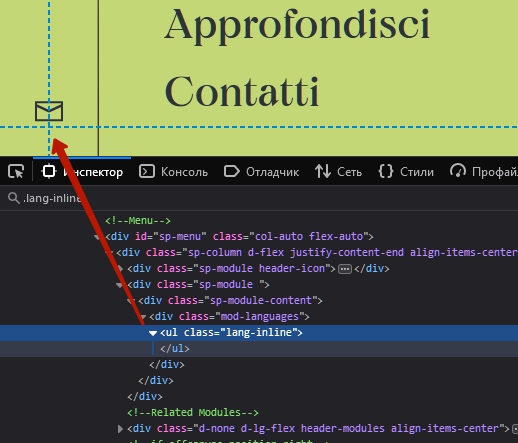
I'm customizing the Maestro Template. The problem is that the "language module" does not appear in offcanvas position or in offcanvas-modules position (visible when menu is opened).
Neither the social icons appear on top-1, top-bar, offcanvas, etc....
here the website under development : https://valpantena.stefanato.com/
Any suggestion ?

Thanks

Accepted answer

Marked as the solution
Pavel

As far as I remember with these icons there is a problem for displaying some other than Top Bar. Use SP PB module with Group Icons Addon, or Custom module with html

15 more replies

Andrea Asked this

Any update?

Ronny Schönfeld-Bahls

Hello Andreas,

briefly times queer asked... I also use the Meastro (https://wsba.eu/).
But have no idea how I can put the articles online so that the Maestro preferences disappear. On your side it looks already quite good.

Can you give me a tip?

Many greetings from Berlin
Ronny

Ronny Schönfeld-Bahls

Hello Andreas,

yes... that's exactly what I mean.
I have no idea how to publish a normal article without the Maestro default.
At the moment it looks like this: https://prnt.sc/HQtDB51YfGII

How did you manage to do that?
Both types are top on your site! :-)

Ronny Schönfeld-Bahls

Sorry Andrea!!!

Andrea Asked this

You must disable the blog options and modules in > template setup > blog
Moreover it's necessay small css code to delete the svg background image.

Andrea Asked this

Hi Ronny,
it's seems ok. Please kindly open another thread because the question of this thread is another...

Pavel
3 years ago · edited

Hi Andrea.

It is there but it is empty. This means that you have not set multi -language on the site. The content of language switching module is displayed only after you will make these settings. This is common Joomla knowledge, not related to the template

Log in to reply.