Fontbook - SPPB Pro 5.05 - Forum | JoomShaper
Solved SP Page Builder

Fontbook - SPPB Pro 5.05

Asked by Josef 3 years ago Last activity 3 years ago

Hello all,

I am currently testing SPPB 5 and am looking forward to the Fontbook option to avoid the hassle of GDPR.

I have a freshly installed system with Joomla 4.3.3 and SPPB Pro 5.0.5 and would like to include the file Lato-Regular.ttf.

Unfortunately, I always get the error message:
"Invalid file type."

When I upload the zip file I get the message:
"No font file found".

What could be the problem?

The solution with the Youtube video https://www.youtube.com/watch?v=MfAIT8cMuv4 can't be it.

You can find the screenshots here:
https://share-your-photo.com/6129ee0fbc/album

Accepted answer

Marked as the solution

8 more replies

Paul Frankowski Senior Staff
3 years ago · edited

Hi Josef,

  1. Update to SPPB 5.0.6
  2. You have to use web font type , for example, .woff (zipped)
  3. I will make a new video soon on my channel.

What could be the problem?

Wrong file format (2). You didn't fully understand 7 steps guide from component.

Paul Frankowski Senior Staff
3 years ago · edited

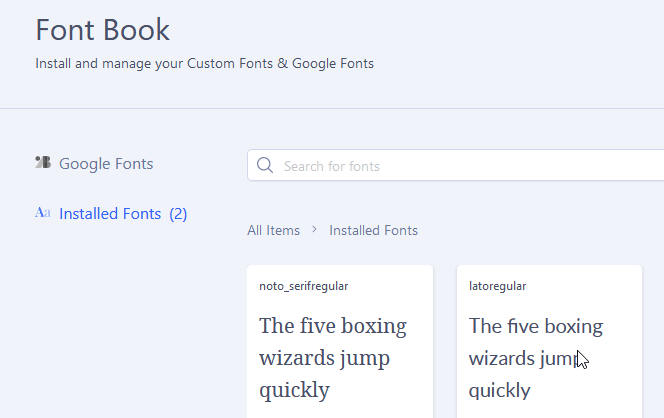
As we can say "lesson learned", and now please in Font Book (SPPB) upload that .zip package generated in fontsquirrel webfont-generator

Download
webfontkit-20230728-090459-lato.zip

After you should get "Lato Regular"
info_1369_2023.gif

Josef Asked this

Hello Paul,
thanks for your answer, your font works!

Can you please create another tutorial on how to create this webfont as a zip?

I have several variations on the site:
https://www.fontsquirrel.com/
and always get an error message "no font file found" with both file formats otf and ttf in a zip-File.

Step by step instructions would be great.

Josef Asked this

Hello Paul,

sorry it does´t work, show the video please.

https://www.dropbox.com/t/0allcNYtyNqpjsQe

1.) I go to the Fontsquirrel website and select the Roboto font and download it.

2.) I unzip the fonts and get the .ttf files.

3.) I select one .ttf file to load the font into the fontbook.

4.) I upload your zip-file into the fontbook - It works

5.) I'm trying to upload the zip file with all the fonts.

6.) I zip a ttf file and try to upload it

Paul Frankowski Senior Staff
3 years ago · edited

No no no.... read again what I wrote.

In Font Book you have to upload .zip file that you get from Fontsquirrel generator.

Roboto regular : webfontkit-20230730-102236.zip

Josef Asked this

Hello Paul,

Thank you very much, the video has clarified all questions.

In my experience you are the best in your support team. 👍👍👍

Problem solved and it will help many EU customers

Paul Frankowski Senior Staff
3 years ago · edited

Big Thanks.

Yes, this feature was asked mostly by EU webmasters, also becuase of GDPR law that we have. In particular, through the restrictive German version of DSGVO law.

Josef Asked this

FYI: GDPR and GDPR are the same and apply to all countries in the EU.

The special problem in Germany, there were only a few lawyers who filed warning lawsuits, which cost website operators several thousand euros.

Log in to reply.