Hello, at the top of our website I would like to reduce the hight of the header/menu and also make the menu center hight wise. I have seen and tried different things but cant get it to work all together. I can alter the hight but the menu ends up to far down the page with still lots of white showing above. I hope this makes sense?
Solved
SP Page Builder
menu / header hight
Accepted answer
Marked as the solution
Pavel
3 years ago
· edited
Hi.
Problems causes your code.
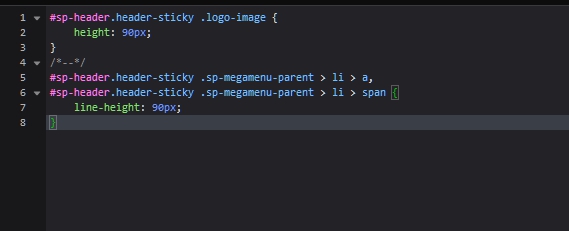
Remove it and configure Header and Logo height in the template settings
Stephen Goodridge Asked this
Hello, thanks for the fast reply. I have removed it but when i change it in the header hight, it doesnt get any smaller, only can make it bigger?
5 more replies
Pavel
It looks almost good now. The value of the logo height should be less than Header height. Otherwise the logo will get out of the box. If you have set the Header height to 50px, you should set the height of the logo to 40px
Stephen Goodridge Asked this
Hello, it looks good on edge browser but on Chrome it looks big still to me?
Pavel
Clean the cache in Сhrome

Rashida Rahman Staff
Hi Stephen!
I could not access your site though. Would you please check?
Best Regards
Stephen Goodridge Asked this
Thats great, all perfect now thank you
Rashida Rahman Staff
Hi Stephen,
Glad that your issue has been solved already.
Thanks goes to Pavel once again:)
Best Wishes!
Log in to reply.