Hi, I wanted to play with the new AI generator in PB. But it's asking for a API key.
Awaiting an answer
SP Page Builder
Locked
API key AI generator SPPB
8 replies
TOCHTERMANN DAMIEN
Go to OpenAI and open an account. There you can create an API KEY. to copy then in SPPB
Robert Asked this
Hi,
Where to copy the key into? I don't see any placeholder in PB settings to past my AI key
TOCHTERMANN DAMIEN
In settings you have to activate Ai option and then enter the key

Paul Frankowski Senior Staff
2 years ago
· edited
Dear webmasters,
API Key that you have to use is from premium (paid!) subscription from: https://openai.com/
And this is not our invention, this is how their system works.
If you have FREE account there, API from it will NOT work!
In SP Page Builder > Settings > OpenAI Key
Delays in generating text or images are caused by traffic on openai servers, it's not on our side!
Robert Asked this
I spotted the issue. I gabbed a Quickstart Pack from downloads. Then the Open AI key input doesn't show up. Using a blank template en fresh PB 5.2 installation it shows up. Dunno why.
Justin
Just updated to 5.2 ... I did a hard-refresh but don't see an option for the key:
Also, is there a way to disable the AI option all together?
Paul Frankowski Senior Staff
2 years ago
· edited
In Helix QuickStart there is LITE version without PRO features.
So you have to reinstall with PRO version first, and reload browser cache etc.
Paul Frankowski Senior Staff
2 years ago
· edited
In theory if you installed PRO version, as I did a minute ago - it should be here
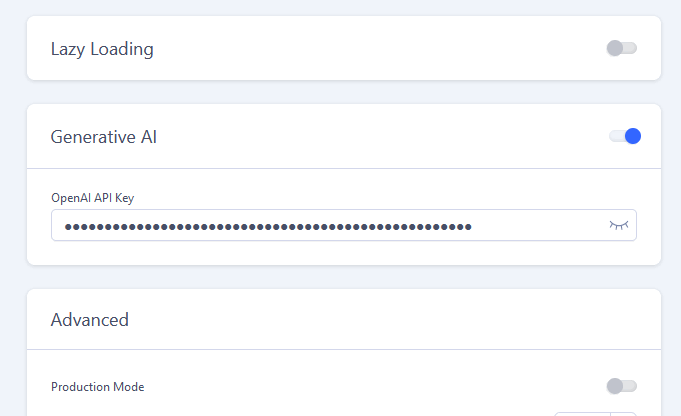
Maybe download and reinstall ones again, just in case...
is there a way to disable the AI option all together?
Yes, you can enable and disable it. Using switcher, visible on my screenshot.
Blue = enabled, Grey = disabled everywhere.
Justin
Thanks, I downloaded and installed the latest version but still no luck. The 'Generative AI' option to disable it also isn't showing either.
Paul Frankowski Senior Staff
Bad luck. Can you share access? But becuase this is not your topic, I suggest to create a NEW topic to share user & pass from other users.
Justin
Thanks,
I've started a new private ticket...
This question is locked, so it takes no new replies. Have a similar problem? Ask a new question.