I have 40 pages and they all have the same sp-page-title-heading. How to add page 1, page 2, page 3 to it.......
Awaiting an answer
SP Page Builder
Add page number to title
10 replies

Paul Frankowski Senior Staff
Hi Aliya,
from Menu item settings. If you have Helix based template it's pretty easy 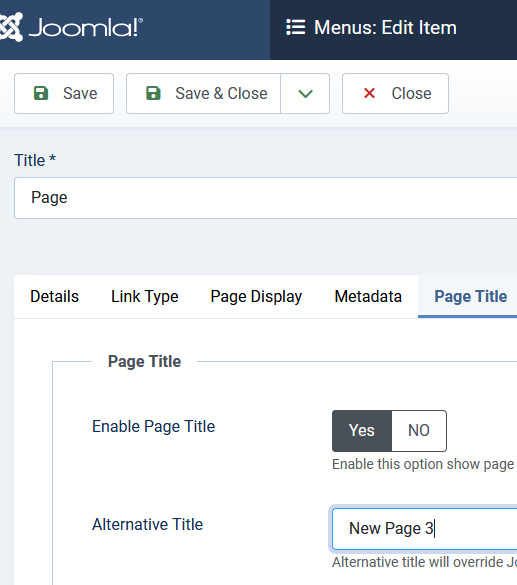
Aliya Asked this
You did not understand me. Pages are generated automatically, for example, in news category blocks. That is, this is pagination of the component. What you propose will make the title on all these pages. And I need page &start20 to have an additional page 2.
Paul Frankowski Senior Staff
2 years ago
· edited
Pages are generated automatically,
Not! Only website webmaster/editor can add new page in SPPB. And Page ID is added sequentially.
Pages from SPPB do not have pagination (bottom navigation) like Articles does. They are standalone pages.
Or we still didn't understand each other.
Share maybe link screenshots or video
Aliya Asked this
My mistake, question about Helix. Is it possible to rename the topic of the appeal?
Aliya Asked this
- <section id="sp-page-title">
<div class="row">
<div id="sp-title" class="col-lg-12 "><div class="sp-column "><div class="sp-page-title"><div class="container"><h1 class="sp-page-title-heading">Каталог Cummins</h1>
<ol class="breadcrumb">
<li class="float-start">
Вы здесь:
</li>
            <li class="breadcrumb-item"><a href="/" class="pathway"><span itemprop="name">Главная</span></a>                <meta content="1">
        </li>
                <li class="breadcrumb-item active"><span itemprop="name">Каталог</span>             <meta content="2">
</li>-
<title>Каталог - страница 2</title>
-
Here are the specific parts of the code that I'm talking about. 1 is how the H1 tag is now built using the tab, as you showed above.
-
This is how I solved the title issue. In the hidden message is part of the code on how I managed to do this.
I would like to be able to use the same code for helix - so that it turns out <h1 class="sp-page-title-heading">Каталог Cummins - - страница 2</h1>
Paul Frankowski Senior Staff
You are using extra plugin system_sitogonmeta - it doesn't belong to us.
Sorry, but we do not provide php support & customization. Support Policy.
I could only share settings tips that we already have.
Aliya Asked this
Of course I use an additional plugin in the creation of which I took part. From an SEO point of view, these are very necessary conditions for indexing and it is very strange that you have not thought through this issue, taking into account your movement towards creating your own store. Perhaps we should pay attention to this? I asked you for help in improving your product, and the name of the file is title.php
Paul Frankowski Senior Staff
For store we have separate component, EasyStore.
Aliya Asked this
That's what I'm talking about. If you create products and pages with pagination, this will have a positive impact on SEO promotion. When h1 will have a specific parameter in the form of page numbering.
Paul Frankowski Senior Staff
I wish you wrote it 3 days ago... ;/ I don't have cristal ball to guess.
Aliya Asked this
My mistake, I thought that I was speaking clearly understandable thoughts, forgetting that people think completely differently. I'll try to summarize briefly. There is a need to create a tool that allows you to automatically add pagination to the h1 tag in components with pagination. For example, news, goods. This will allow you to better configure SEO optimization, which will make your product very competitive in the market.
Log in to reply.