How to remove a domain from the PB agency plan? - Forum | JoomShaper
Awaiting an answer SP Page Builder

How to remove a domain from the PB agency plan?

Asked by Eric Caldwell 2 years ago Last activity 2 years ago

We have the Pagebuilder Agency plan and I found where we can add a domain but I can't locate where we remove a domain and these instructions returned by your help system are innacruate.

To remove domains from your Pagebuilder agency plan, please follow the steps below:

Log in to your JoomShaper account.
Go to the "My Subscriptions" page.
Click on the "Manage" button next to the Pagebuilder agency plan.
Click on the "Remove" button next to the domain you want to remove.
Confirm the removal.

4 replies

Paul Frankowski Senior Staff

Hi Eric,

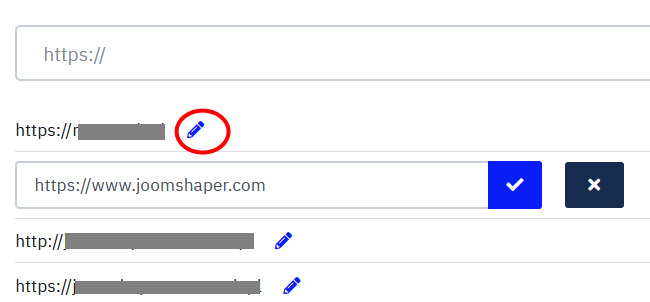
you cannot delete, but you can edit current one. Click [pen] icon > Put a new domain > click blue [v] icon

info_1983_2023.jpg

Eric Caldwell Asked this

This customer is moving their hosting account to another company so we're no longer going to maintain their license.

This is the reason for wanting to remove these. Would be nice so that we don't have to edit those domains and put dummy domains in and simply delete them.

Paul Frankowski Senior Staff

Yes, just put subdomain by now, later you can edit it.

I understand. Don't worry.

Eric Caldwell Asked this

Also, I just added domains to my Pro plan and because the bottom of the domains was cut off, I now have the same domain in there twice.

Log in to reply.