Images need a complete URL to appear - Forum | JoomShaper
Solved SP Page Builder

Images need a complete URL to appear

Asked by Alex Nejati 2 years ago Last activity 2 years ago

Hi All,

I experienced an issue where I tried to replace some images on my website. When I upload an image and select it to appear as, for example, a row background, the image URL should be complete (it means with the domain name, folder, sub-folder etc.), and relative path wich is inserted by Joomla itself does not work.

Could someone please assist me to fix the issue?

Thanks!

Accepted answer

Marked as the solution
Paul Frankowski Senior Staff
2 years ago · edited

2nd possible reason: your current site is now in temporray subfolder "/23/" - and Joomla thinks that root path is domain without "/23" as quick-fix solution you can update/edit your configuration.php file and put domain path with "/23" to it.

HERE:
public $live_site = '';

Alex Nejati Asked this

Thanks Paul!
This option resolved the issue. It means I should do the same for all sites I installed in subfolders.

Cheer!

2 more replies

Paul Frankowski Senior Staff

Hi Alex,

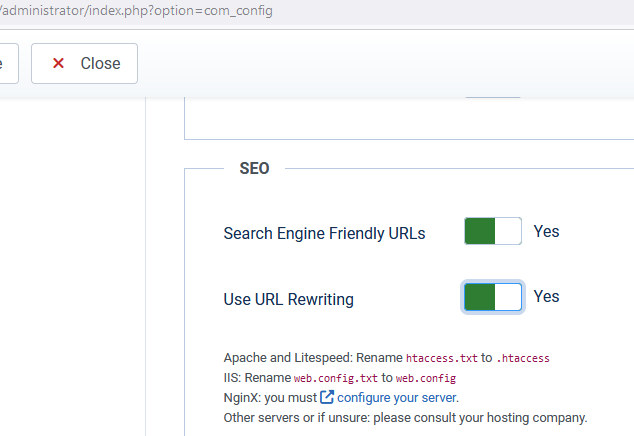
it may be caused by that you don't use Joomla SEF/SEO, and all subpages has long URL alias, for example,
/index.php/pages/about-us

why don't you use Joomla core features like: renamed .htaccess file and this settings in Global Configuration
info_2050_2023.jpg

Paul Frankowski Senior Staff
2 years ago · edited

As summary thougts, probably if you had configured the two slightly differently from the beginning and used a subdomain rather than a subfolder to install Joomla, everything would have been OK. But we all learn from mistakes, either our own or others'.

Log in to reply.