Hello,
when i look at my website www.patronaatepen.nl i see that the menu is not correct.
How can i make it looks fine again?
Solved
Templates
menu in helix ultimate template looks not fine
Accepted answer
Marked as the solution
Paul Frankowski Senior Staff
Peter, look and compare two menu items.
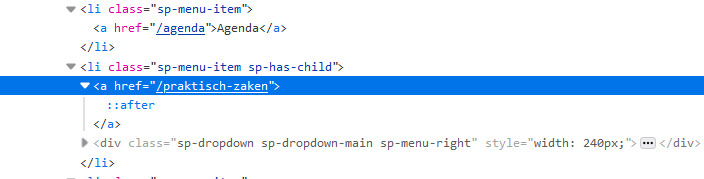
do you see what is missing now?
Agenda menu item is OK, but the 2nd menu item (praktisch-zaken) - doesn't have menu item name, is empty! Go to Menu > Main Menu find it, and add menu item name.
Peter Asked this
Ok got it... stupid from me... Sorry..
4 more replies
Paul Frankowski Senior Staff
Hoi Peter,
There is problem caused by menu item "praktisch" please hide that menu item or use icon or use real name "Praktisch" for it - and problem will be fixed.
View with hidden menu item.

Peter Asked this
Sorry Paul i don't know what you mean by
use icon or use real name "Praktisch"
Where do i have to do that?
Peter Asked this
Hi Paul, could you help me a little bit more?
Paul Frankowski Senior Staff
The problem is with that menu item. For test disable that menu item, and you will see that all works again.
I suggest to add missing name for it, or add that menu item again.
Paul Frankowski Senior Staff
Now is OK, I can confirm.
You're welcome.
Log in to reply.