FORM BUILDER not sending 2 emails from a submitted enquiry - Forum | JoomShaper
Awaiting an answer Extensions

FORM BUILDER not sending 2 emails from a submitted enquiry

Asked by Michael 2 years ago Last activity 2 years ago

Hi Support,

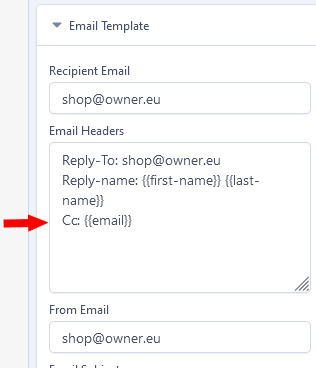
Just wondering if the FORM BUILDER, can send reply email - to 2 email addresses... that being the website owner... and also the customer, so they both get a copy of the online form submission in email format?

One of my clients sites ... the customer gets the email from the FB, but the FB is not sending a copy of the email to the clients email as well.

Can you please help?

Cheer, Syco

5 replies

Michael Asked this
2 years ago · edited

Hi Paul,

Thanks... but I have already set that up - as per the manual and your suggestion...
I explained the issue around the wrong way... in my original text.

When testing... it works with my email 2x different business email accounts... but not the clients businesses email when we test it on his server.

So I did a test ... I used my 2x - .gmail.com - accounts that I have... I changed both the person making the enquiry... and the 'recipient email' - to the 2x different gmail.com accounts in other words ... and it did NOT send an email to 'either' of the gmail sccounts ... but when I changed it back to my 2x personal business domain emails... it worked.

Why does it not work with the gmail.com accounts when trying to test it, ... or my clients email?

Something weird is going on... and it's hard to fault find, as it works when I use my own emails to test it.

Cheers,
SYCO

Paul Frankowski Senior Staff

I am not a Google employee to answer this question. I can only assume that these messages end up in the SPAM tab, check there. If yes, somehow for GMail it's a suspicious message.

Michael Asked this

Yes... it's weird, and I kept checking if they went to spam... but nothing there.

It's got me confused :(

Paul Frankowski Senior Staff

Some things I can't get over....

Michael Asked this

Yes, I have tried and also use his on this website as well on a different FORM ... and when I tested it... it does the same thing.... grrr

Log in to reply.