

SP Pagebuilder Pro + Template - How To have Access To The Pages Structure?
C
Claudino
Hi everyone, good morning!
Hopefully somebody can help me... I have a site in latest Joomla and Helix ultimate. I want to change the design, so I've bough Gazette template and SP Page Builder pro. I've Installed them in the current installation. I didn't installed the Quickstart package because I already have my own content - my problem now is, even after the new template installation, I don't have any of the template pages structures in SP Page Builder, so my question is: – Is there a way to have access to the template pages structures, in a non Quickstart install? some import/export available, or maybe I'm missing something? (I did set the new template to be the default for all pages, but to tweak them, I need to see them in SP pagebuilder...)
Thanks in advance!
2 Answers
Order by
Oldest

Paul Frankowski
Accepted AnswerHi Claudino,
Yes, on subdomain install quickstart, becuase as you could see and read - joomla template do not include demo data - then export needed pages from it, to your final website, page by page.
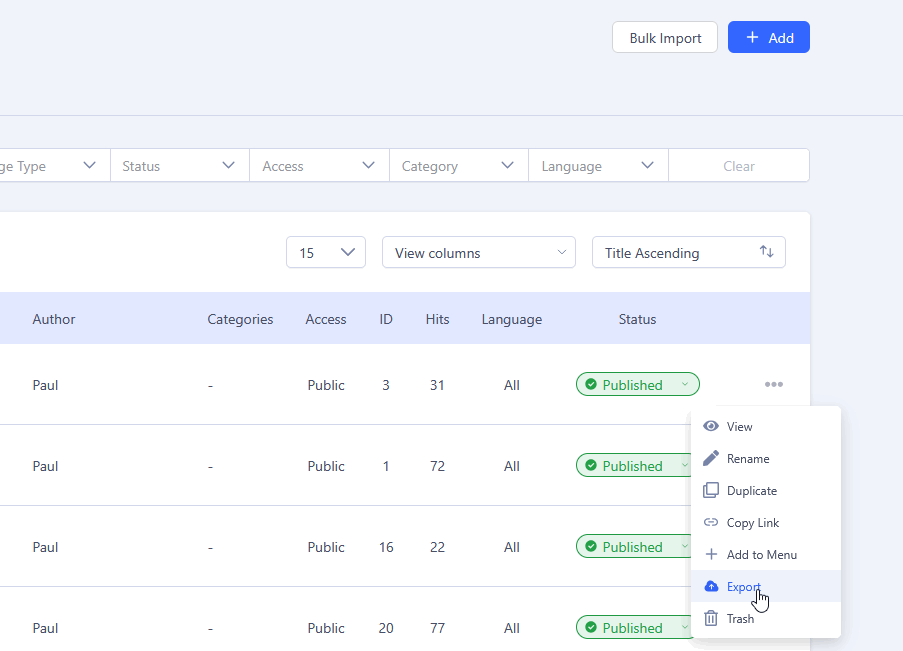
Then on the final website, create a New > Import (.json) file, yes, one by one.
In your case it's the safest way. Remember that on QS there are also modules used mostly on home page and bottom areas.