

Move And Add Elements In A SPPB Addon

Django
Hello With SPPB on the template Fortune, I can't add images or change their place as I want. For ex when I change the margin or padding, the image becomes smaller. Same thing for the colored background : I can't impose the width I want.
Django
5 Answers
Order by
Oldest

Ofi Khan
Accepted AnswerHello Django
You need to use custom position for the images. Then you will able to set them in any places you want. Check the addon settings -> advanced settings and turn on Custom Position.
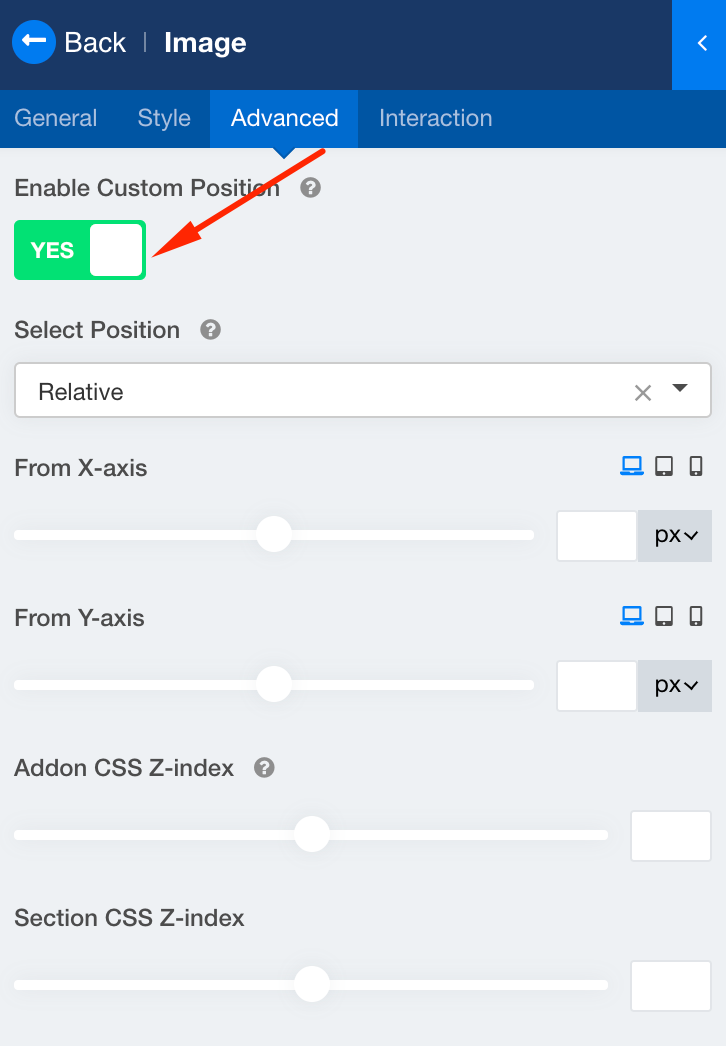
Best regards
Django
Accepted AnswerThanks Ofi. I'm fighting with the parameters in this "Advanced" tab, but I don't know what is best , absolute or relative, and what I get in the visitors frontend is not what I have in the frontend editor.
Last minute : I think I have to give up, and use another SPPB addon. It's just a nightmare to make each element to display properly, and then to be responsive. After I had a display almost correct on large screens, I was trying to have an acceptable display on tablets. Impossible. I have overlayed elements, and I can't reach the parameters of the elements behind.
SPPB has a lot a possibilities, but some of them are not usable, and make us lose much time.
Ofi Khan
Accepted AnswerI understand what you are talking about. The more options are there, the more complex it gets. But if you want to stand out in the crowd, then you have to invest your time building your site. I am sharing a tip with you. First make a section and then hide it on tablet and mobile. So, it is only visible to desktop. Then make another section for tablet and mobile and hide it for desktop. Have a look here to understand CSS Position Property to clear confusion about absolute and relative. A good tutorial playlist on SP Page Builder is here.
Django
Accepted AnswerWhy do you recommend to make 3 different sections for desktop/tablet/mobile, because on SPPB, on a single section, we can (theoretically) make a different dysplay for each addon on the 3 types of screens ?