

Wayne Template & Off-Canvas Toggler Issue.
SE
Sound Enclave
Hi!
I has been trying to figure out how to make the off canvas toggler to show on mobile without luck. It shows only in normal screen size and if menu type is set to megamenu & off canvas but only in the left side and once it goes responsive to mobile sizes its dissapears. Can you guys point me in the right direction?
Setup: Joomla 5.4.1 Framework: 2.2.3 PHP 8.2 Wayne 2.0.2
Website
https://www.dubbingdesk.com
8 Answers
Order by
Oldest

Paul Frankowski
Accepted AnswerHi,
Fixed, somebody disabled Menu position on Mobile view, in Layout settings. And forgot to set GRID for Mobile view for Header columns. And I used extra line of Custom CSS, just in case.
SE
Sound Enclave
Accepted AnswerThanks for the quick support and the toggler fix.
There is another issue I has not been able to solve, and is the menu -> page title setttings. In the template demo and quickstar package each page have its own page title settings an image by example:
https://demo.joomshaper.com/2018/waynecorp/index.php/en/about -> "About Us We are Wane Corporation" and the image https://demo.joomshaper.com/2018/waynecorp/images/demo/about-subtitle.jpg
In my site: https://www.dubbingdesk.com/about.html that display setting is being ignored even when the menu setting have it enabled and it should show the demo image: https://www.dubbingdesk.com/images/demo/about-subtitle.jpg

I am missing something? Should i start a new forum topic for this specific issue or should i keep it in here?
Paul Frankowski
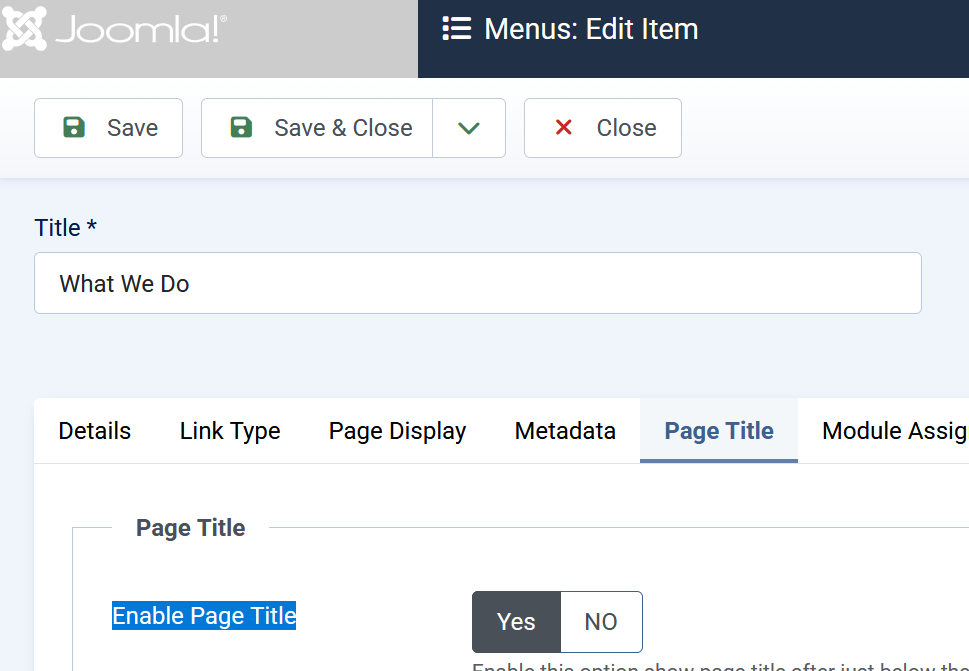
Accepted AnswerThat image used as background should be set using Menu Items settings. Check tab "Page Title" there is Background Image and set "Yes" in "Enable Page Title"
example
Paul Frankowski
Accepted AnswerThis was missing, somebody deleted(!) - now is OK when I added it.
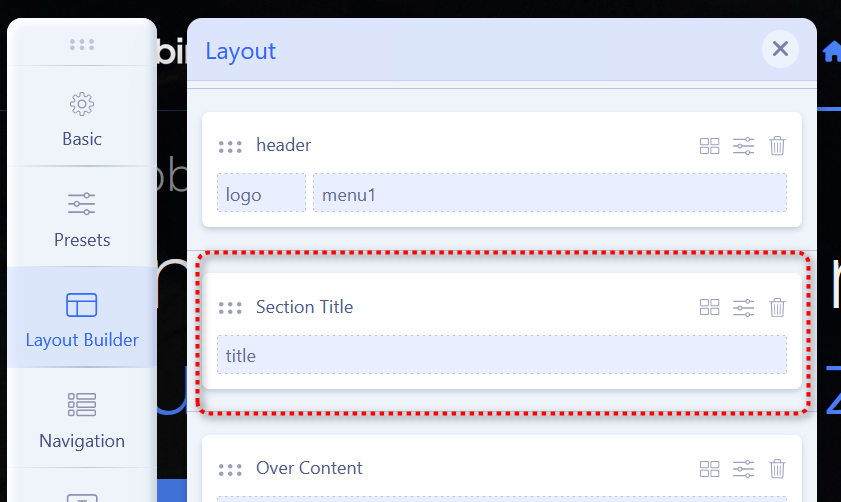
last step: replace that image file: images/demo/about-subtitle.jpg
to get universal bg image, don't worry it won't be overriden by template update.
SE
Sound Enclave
Accepted AnswerThanks again for the quick reply and fix!. That was fast.
A quick question, it should work the same for Single Article Menu right? When adding a Single Article menu and enabling Page Title, is ignoring the image, Alternate Title and Page Subtitle from menu -> page title setting, it only renders the article Name instead of Alternate title and article standard blog featured Image instead of the Menu background image set on page title options.
By example: https://www.dubbingdesk.com/privacy-policy?format=html
Paul Frankowski
Accepted AnswerI can help with existing settings, I cannot change code behavior.
Remember that if you would use Page (SPPB) you can recreate Page Title using extra row/section with custom BG Image + Header addon etc. So you don't have to use Menu item settings.
SE
Sound Enclave
Accepted AnswerHey Paul,
Thanks for your help, fixes and professionalism. I understand, the template was designed that way by reading how the content override is currently coded. I will just workaround it to use the article menu because in my use case i need to show dates of modification to the terms. Using SPPB is a possible soltution using the text block but there is no versioning or publishing options.
Again thanks for your help in the other issues.
Best
Johnny