

Remove Sidebar Menüs
T
Tobias
Hello,
I would like to hide the side menu for certain users in the backend as soon as you go to Components - SP Page Builder - Pages. I find editing pages in the backend with PageBuilder much nicer than in the frontend. Now users should be able to edit their own pages. I have set this up with the permissions. However, they always see this page bar in the backend, even though they only need to/should stay in the Pages menu item.
They have the following permissions (see image). I had to select Create, otherwise they wouldn't be able to upload images. So, in principle, everything works as I want it to. Unfortunately, they have this sidebar and can activate article integration, for example. So, ideally, I would like to remove all menu items except Pages OR remove the entire sidebar.
Of course, the superuser should be able to see everything normally.
4 Answers
Order by
Oldest

Paul Frankowski
Accepted AnswerHI Tobias,
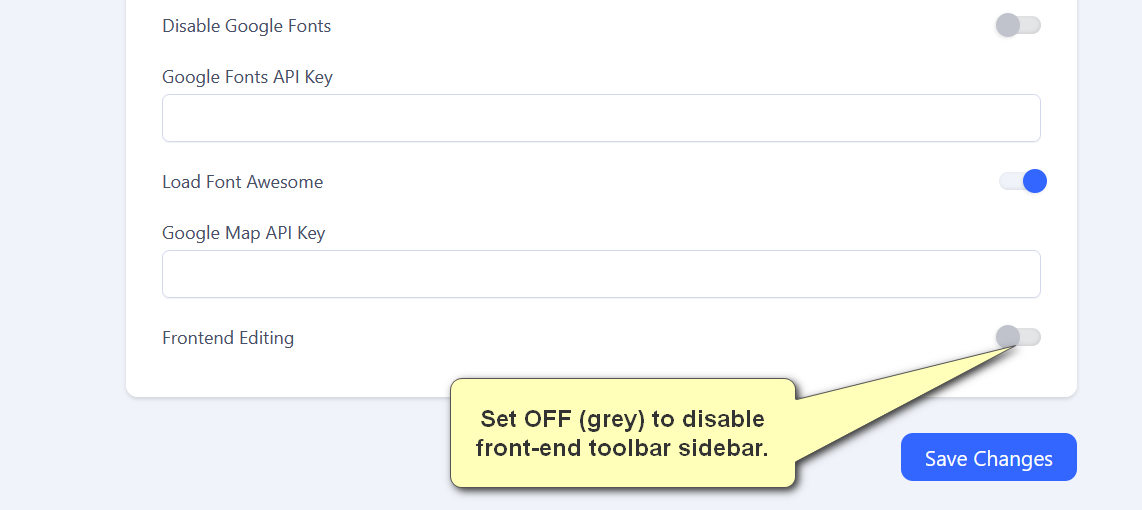
This sidebar is toolbar , you can disable from front-end by using SPPB Settings. Just find option Disable "Frontend Editing" and use it (screenshot). Then you will be able to edit pages only using the back-end editor.
Remember that editor is only for Administrator users, typical Register user cannot see or use it.
Paul Frankowski
Accepted AnswerBy now, only this option is available in Settings.
Please mark topic as solved after.
T
Tobias
Accepted AnswerI was already familiar with this option. However, I am specifically concerned with the backend. I have already set everything up so that you can edit your items. (I find the view in the backend to be much clearer). I would just like to hide the sidebar/toolbar (see screenshot) in the backend.
Paul Frankowski
Accepted AnswerWhat is purpose to hide toolbar also in back-end editor?
By default is not possible, you have to use Custom CSS plugin that works in admin area, to hide it. But it's far beyond support that we provide here.
If I understood incorrectly, please make a screenshot again, add color lines, and show me.