Site Error - Question | JoomShaper

Site Error

R

Ronald

General 1 week ago

Hello, I recently updated my synology to the latest supported Joomla verion: Joomla 4.4.13 PHP 8.2.28 MariaDB 10.11.11 Apache 2.4 (FPM-FCGI)

I also updated the following Joomshaper items to the lates version. I was told the latest versions were supported.

Decora template 2.0.2 SP pagebuilder 6.2.3 SP imagegallary 2.1.1 SP simple portfolio 2.2.0

After the update I am recieving an error in the heading of the site:

Deprecated: json_decode(): Passing null to parameter #1 ($json) of type string is deprecated in /volume1/web_packages/joomla/templates/decora/features/logo.php on line 36

I am also recieving an out of memory error: https://postimg.cc/NKgnq2GV

Maybe som PHP settings are not correct? I posted my PHP settings in the hidden content.

My site is https://www.rubouwdesign.nl/joomla/

Could you help me get this fixed? Thanks.

0
4 Answers
Paul Frankowski
Paul Frankowski
Accepted Answer
Senior Staff 1 week ago #218185

Hoi Ronald,

(1) About error message, it's small warning, please try this DIY method:

Download Helix Ultimate template, and take that file from it /features/logo.php and upload & override yours: templates/decora/features/logo.php

0
Paul Frankowski
Paul Frankowski
Accepted Answer
Senior Staff 1 week ago #218186

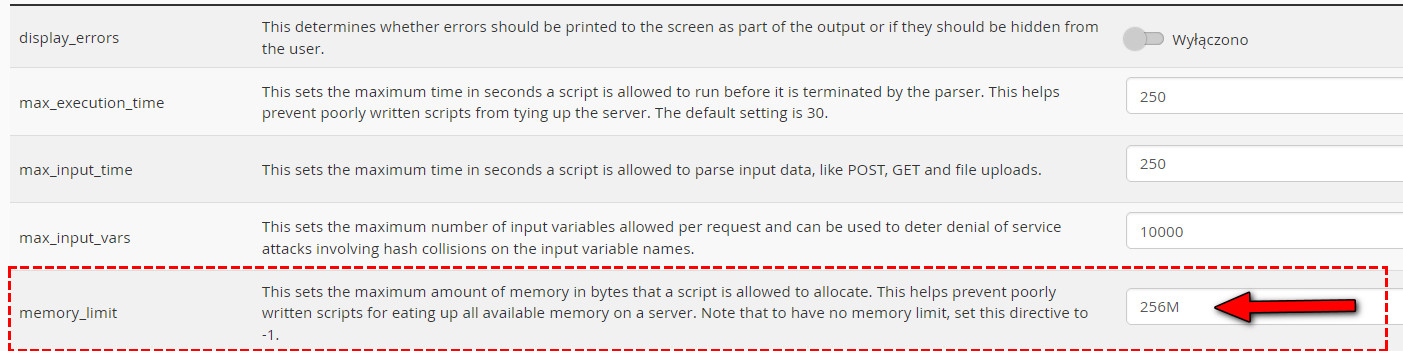
(2) About Memory, indeed, right now you have: memory_limit 128M but your Joomla needs 2x or even more.

In Hosting Panel set 256M or 512M (better!). Example (from cPanel):

info_3920_2026.jpg

(3) PHP Version: PHP 8.3 should be better compare to PHP 8.2 too, it also needs less memory to manage php scripts.


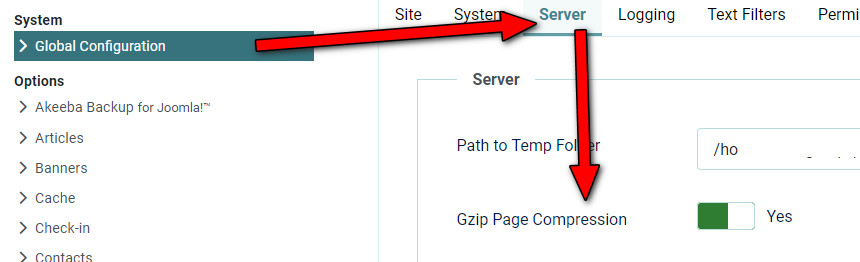
(4) Ask Hosting Support (if you're not sure) if you can use GZip compression. In cPanel > MultiPHP INI > zlib.output_compression : On.

info_3919_2026.jpg Then inside Joomla Admin: Global Configuration > Server > Gzip Page Compression: On. It compress files, and it means less memory is used. info_3921_2026.jpg


Some hostings also allows using LiteSpeed Web Cache, it's also a good thing.

0
R
Ronald
Accepted Answer
1 week ago #218203

Hello,

Thanks for the answers!

  1. Replacing the logo.php file worked fine!
  2. I increaced the memory tot 512M. After that the site worked already.
  3. PHP 8.3 is a bit dificult for me. It's a self hosted site on a Synology, so I'm limitted to what Synology rolls out. PHP8.2 is the standard, I don't know if or how I can manually set it to PHP 8.3. So for now I will leave it. Unles you can help?
  4. In my PHP extentions on Synology I turned on zlib - This module eneables you to transparently read en write gzip. I then went to the Global config in Joomla and saw that Gzip was already turned on.

I stil sometimes get the message "Service Unavailable

The server is temporarily unable to service your request due to maintenance downtime or capacity problems. Please try again later." on a blank page.

Refreshing then gives me a further error: https://postimg.cc/yD5LjcTh

It often happens on the site page "Projecten" where I have a numer of gallery tiles. Opening one of these tiles gives me an Out of memory error.

I also saw that eventhough I set memory limit to 512M on my synology, Joomla still lists 128M. How is this possible?

So I'm going to try to install LSCache tomorrow. Maybe it will help. Any further tips? Could it be the PS Imagegallery that is a problem?

Thanks for helping.

0
Paul Frankowski
Paul Frankowski
Accepted Answer
Senior Staff 1 week ago #218204
  1. Support of PHP 8.2 ended, I mean from them (PHP developers).
  2. Joomla questions > forum.joomla.org
  3. I don't think so.
0