

Addon Article Layout Doesn't Work Fine In My Newsberg Template
ES
Europa en Suma
I installed the Newsberg template on my site using the quick start pack. On the homepage that comes with the template, there is an addon called "Article layout." My problem is that I can't select any layout other than the default one—I can't click on the designs, nothing happens, and two broken images are displayed. How can this be fixed? Thanks.!
[img]https://i.ibb.co/93GRcD3P/joomshaper.jpg[/img]
![https://i.ibb.co/93GRcD3P/joomshaper.jpg[/img]
7 Answers
Order by
Oldest

Atick Eashrak Shuvo
Accepted AnswerI apologize for the inconvenience caused. Could you please check now and let me know if the issue is resolved on your end?
Looking forward to your response.
Best regards
ES
Europa en Suma
Accepted AnswerHi!! Thank you very much, it's working properly!! Best Regards, María
Atick Eashrak Shuvo
Accepted AnswerHi María,
Thank you for the update — glad to hear everything is working properly now!
If you need any further assistance, please don’t hesitate to reach out.
Please marked the issue as solved
Best regards
ES
Europa en Suma
Accepted AnswerYes, I have another question!
I would also like to know if each item can have its own image and not only the main item.
And for the main item, ¿Is it possible to change the size or is a fix size?
Thank you.

Atick Eashrak Shuvo
Accepted AnswerHi,
Thank you for your question.
I’m sorry, but I wasn’t able to fully understand the issue from your message. Could you please provide a bit more detail about what you are trying to achieve? If possible, sharing a screenshot or a brief example would be very helpful.
This will allow me to better understand your requirements and provide you with an accurate solution.
Looking forward to your response.
Best regards
ES
Europa en Suma
Accepted AnswerThank you for your help.
I have found the solution. The images need to be added in the "Blog Media" tab for each article.
Thanks again for your support.!!!!
ES
Europa en Suma
Accepted AnswerI have another issue with the article layout:
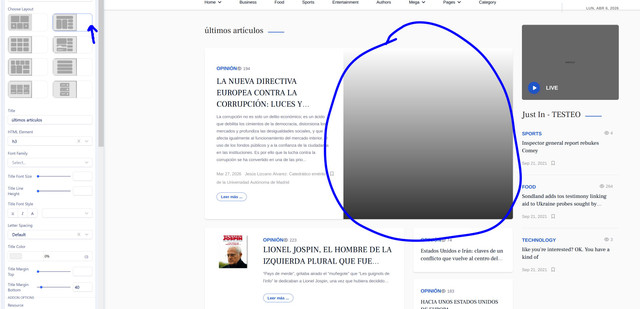
With the image capture layout, the image doesn’t display, no matter which image I use. [img]https://i.ibb.co/bgxtXD63/c1.jpg[/img]
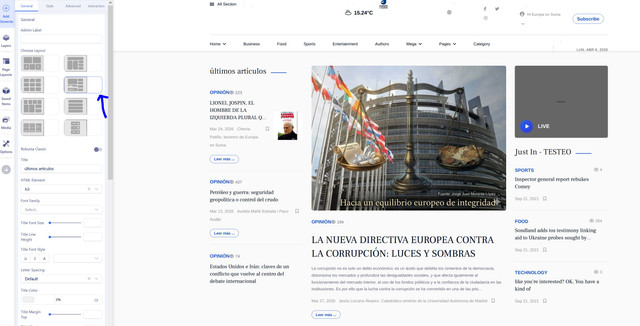
If I select a different layout, the image is displayed correctly, as shown in this screenshot: [img]https://i.ibb.co/0yrGqFpV/c2.jpg[/img]
Same problem when I enable "Robusta Clasic" : [img]https://i.ibb.co/Mds1MGx/c3.jpg[/img]

Thank you very much for your help! Maria