After updating Joomla to 5.4.7 and Helix Ultimate to the latest version, the Gazette article Blog Media tab no longer removes the Featured Image. The image preview disappears, but the modal returns: “Unable to remove image. Please try again.”
Solved
Helix Framework
Unable to remove image. Please try again
Accepted answer
Marked as the solution
Mehtaz Afsana Borsha Staff
Glad to know that, You can now close this post by accepting the answer.
11 more replies
Renzo Carlucci mediaGEO Asked this
3 months ago
· edited
Solved, I cancel and rewrite the article.
Sorry but the problem is again active, every new articles cannot cancel Image.
Mehtaz Afsana Borsha Staff
Hi,
Thanks for contacting us and glad to know that its solved.
-Regards.
Renzo Carlucci mediaGEO Asked this
Sorry, I have cheked again today but the problem is not solved.
Mehtaz Afsana Borsha Staff
Could you please keep a full site backup and give me your super admin access? So that I can check.
frank succardi
3 months ago
· edited
Same for me.
If I copy an existing article and go to Blog media tab and try to remove the article header image I get an error.
If I make a new article I can add an image normally, but not remove it.

Paul Frankowski Senior Staff
3 months ago
· edited
Ciao,
it will be fixed in next update, till Monday.
We apologize for the temporary inconvenience.
miked
I am experiencing exactly the same problem after updating Joomla to 5.4.7 and Helix Ultimate to the latest version.
When I try to remove the featured image from the Blog Media tab, the preview disappears, but I receive the message: “Unable to remove image. Please try again.” After saving or reopening the article, the image is still assigned.
This is very irritating, especially when copying existing articles and replacing their images. Is there any temporary workaround or file/database fix? Please let us know how this issue can be resolved and whether an update is planned.
Paul Frankowski Senior Staff
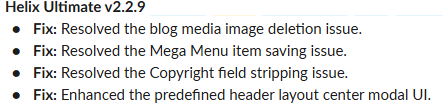
Temporray fix: https://www.joomshaper.com/forum/question/45230
Yes, till Monday morning a new version should be ready.
Renzo Carlucci mediaGEO Asked this
If the new version is not yet ready, can you please send us the file to be changed?
Paul Frankowski Senior Staff
Renzo Carlucci mediaGEO Asked this
Ok thanks
Mehtaz Afsana Borsha Staff
Hi Paul, Thanks for sharing the solution with him.
Hi Renzo,
Is this solved now? If yes, you can then close this post by accepting the answer.
Renzo Carlucci mediaGEO Asked this
Yes it is solved now.
Mehtaz Afsana Borsha Staff
Thanks for accepting the answer.
Log in to reply.