Form Builder - The High Of Textarea - Question | JoomShaper

Form Builder - The High Of Textarea

JT

Jan Terporten

SP Page Builder 5 days ago

Hello,

i want to need the Formbuilder in SP Page Builder, but the high of the textarea for the message ist like the high of the name or of the email-adress. How can I get a bigger (higher) Textarea only for the message, without changing the high of the filed "name" or of the field "Email-Adress"?

0
12 Answers
Mehtaz Afsana Borsha
Accepted Answer
Support Agent 5 days ago #228296

Hi,

Thanks for contacting us. Do you want to change this text area height? Could you please explain it a bit more?

https://prnt.sc/wnOGPi22Dmun

Regards,

0
JT
Jan Terporten
Accepted Answer
4 days ago #228317

Hello, thanks for your help. I want to change the hiegh of the text area. I use the Empire-Template.

www.terporten.net/images/Test/Message_Problem.jpg

0
Mehtaz Afsana Borsha
Accepted Answer
Support Agent 4 days ago #228411

Give me your site URL please, I need to check.

0
JT
Jan Terporten
Accepted Answer
4 days ago #228420
0
Mehtaz Afsana Borsha
Accepted Answer
Support Agent 4 days ago #228424

Hi,

You can use this CSS in your custom.css file

input#sppb-form-builder-field-5 {
    width: 100% !important;
    min-height: 200px !important;
    height: 200px !important;
    resize: vertical;
    box-sizing: border-box;
}
0
JT
Jan Terporten
Accepted Answer
4 days ago #228427

OK, that works. But now the "field placeholder" is in the center. How can I set the field placeholder in the top of the field?

https://strandlodge-renesse.de/index.php/kontakt

0
Mehtaz Afsana Borsha
Accepted Answer
Support Agent 4 days ago #228436

Hi,

Please try this one

input#sppb-form-builder-field-5::placeholder{
    line-height: normal !important;
    padding-top: 15px !important;
        }
0
JT
Jan Terporten
Accepted Answer
4 days ago #228441

Hello, this doesn't work.

Look at the picture:

www.strandlodge-renesse.de/images/Test/Test.jpg

0
Paul Frankowski
Paul Frankowski
Accepted Answer
Senior Staff 3 days ago #228451

@Jan

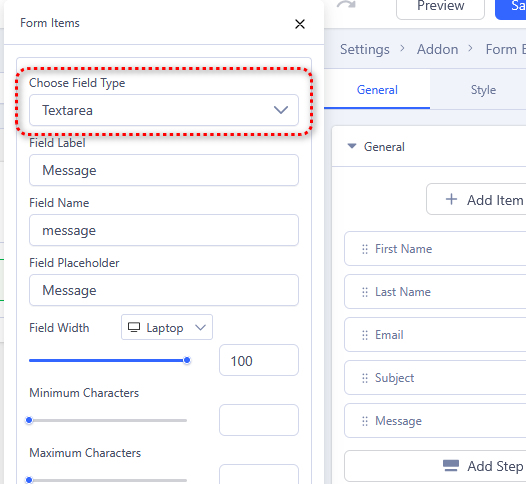
Are 100% sure that that field is Textarea not typical Input field, check your settings - correct if needed

info__367.jpg

0
JT
Jan Terporten
Accepted Answer
3 days ago #228469

Hello, now I have choose textarea (first I chosse text). With textarea the first code for the height doesn't work.

The Configuration: www.strandlodge-renesse.de/images/Test/Picture_01

The Site by choosing textarea: http://strandlodge-renesse.de/index.php/kontakt

0
JT
Jan Terporten
Accepted Answer
1 day ago #228681

Is there no solution for my problem?

0
Paul Frankowski
Paul Frankowski
Accepted Answer
Senior Staff 1 day ago #228685
.sppb-addon-form-builder-form textarea.sppb-form-control {
  height: 150px !important; }

Go to Page Settings > Page CSS > Custom CSS

0