

Travus Template
A
Ahmed
Hello Support Team,
We intend to use your Travus template. Unfortunately, the maps in the contact section are not working in either your demo or our test environment. Is there a specific reason for this? And if there is a code error, where can we fix it?
Many thanks in advance.
4 Answers
Order by
Oldest

Paul Frankowski
Accepted AnswerHi Ahmed,
it was caused because OpenStreetsMaps recently disabled Map style that was used as default in our component and QS. I asked our developer to take look into our demo page.
Solution: go to component settings and change Map view, choose different one, Save and will be OK
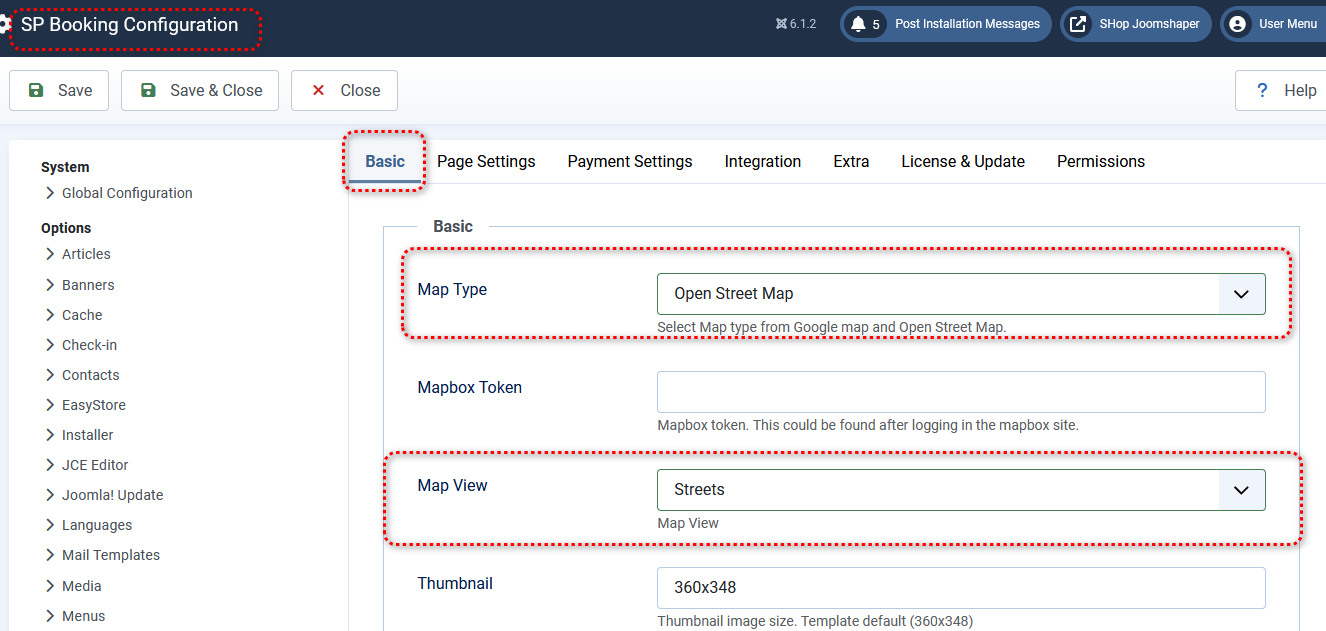
Paul Frankowski
Accepted AnswerWith GoogleMaps , no problem, only one view if you have valid API key.
A
Ahmed
Accepted AnswerHello Paul,
Thanks for the explanation. Could you also show me where I can change the destination price range? It's always set to 0 to 9999. I want to change this, but I checked the entire SPBooking setup and couldn't find it.
thanks indeed.
Paul Frankowski
Accepted AnswerIt's hard-coded, you cannot change that from component settings. It's inside . js file.
In component folder find file: assets\js\spbooking.js find & customize (min & max). Probably it's that part:
if (ranger !=  null) {
        // has price value
        var minprice = $('#min-price.spbooking-ranger').val();
        var maxprice = $('#max-price.spbooking-ranger').val();
        if (!minprice) {
                var minprice = 0;
        }
        if (!maxprice) {
                var maxprice = 9999;
        }