

Package Types Travus Template
CL
Charley van 't Leven
Dear all,
I want to make more package types, but I can't find where to do this. When I try to add a menu item for a selection of Packages, I only find Package Type: "Daily Tour" or "All". When I create a new Package, I only have the options for "Long" and "Day Tour". But where can I edit these options? I want to have at least 4 types here.
When trying to remove Rooms, get the following error: 0 Class 'AdminController' not found How can we solve this?
Is it also possible to disable some options? Like Accomodations and Rooms?
And where can I translate the Search section on the homepage?
Thanks.
9 Answers
Order by
Oldest

Rashida Rahman
Accepted AnswerDear Charley,
Yes, I can!
Here are some screenshots:
Packages with testf package type: https://prnt.sc/z0ziIiYqdKKI
Menu item with testf package type selected: https://prnt.sc/TZidP8PBnq_P
Output of the menu item on the frontend: https://prnt.sc/U3uQXIoYWQmR
Best Regards
Rashida Rahman
Accepted AnswerHi there!
Thanks for your query.
You can create categories of different types as per your need. Here is the related doc:
And here is all about translation:
Hope this helps!
The error '0 Class 'AdminController' not found' is not familiar to me, but kindly make sure the room is not associated with any of your published entities.
Best Regards
CL
Charley van 't Leven
Accepted AnswerHi Rashida,
Thank you for your message. But I have checked the documentation and it's only helpful for adding Packages Categories.
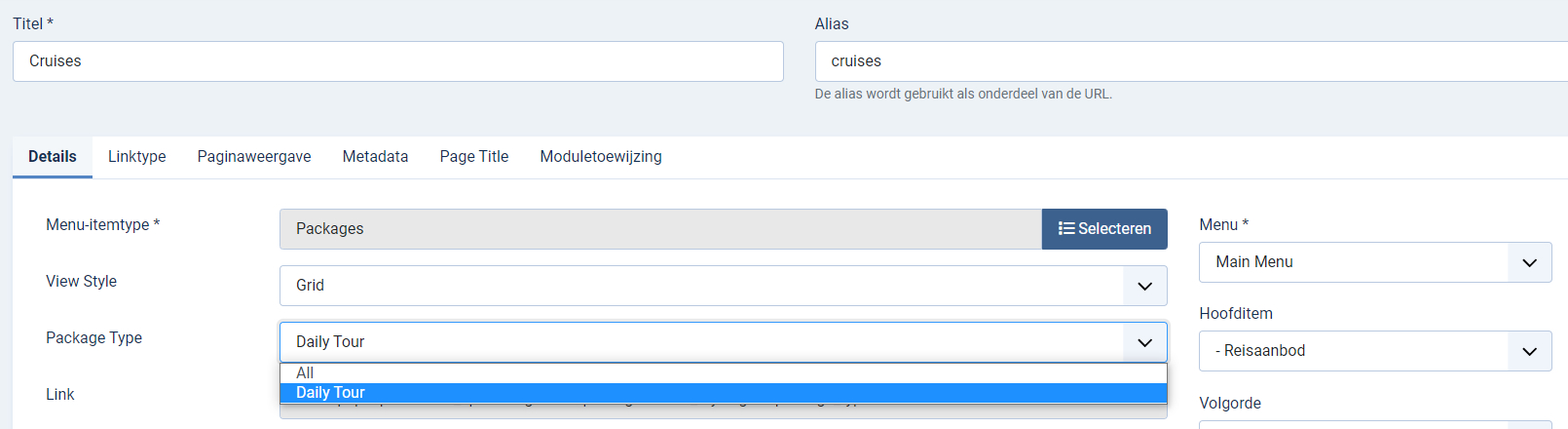
When I try to add a menu item for a selection of Packages, I only find Package Type: "Daily Tour" or "All". See below:
When I create a new Package, I only have the options for "Long" and "Day Tour". See below:

But where can I edit these options? It's not listed under SP Booking > Categories...
Rashida Rahman
Accepted AnswerHi,
Yes, you are right!
There is no default way to add new package type. It needs code customization, which is prohibited here.
But I can give you suggestions only.
Steps to follow:
- To create a new package type to appear within a new package creation window: https://prnt.sc/0tk-ehTRxYdI
- To create a new package type to appear within a new package menu item window:
Note: File paths and instructions are within the screenshots. Please navigate to those paths and open those files with an editor, then make the indicated changes and save files. You need there to copy/paste similar text from above and make small changes to which name you want it to see. I use the name 'testf' for example.
Hope this helps!
Best Regards
CL
Charley van 't Leven
Accepted AnswerDear Rashida,
Thank you for your message. I have made the modifications and I see the types now in the administration section, but it does not work.
I've added by example the package type "cruises". I can select this new package type when adding a new package. I can also make a menu-item to show all packages with this package type "cruise". But on the front-end it says "No packages found".
I must need to make different category-pages, so that if you click by example on the Cruises-page, you only will see the Cruises.
How can we solve this?
Thanks
Please see: http://beta.scenictravel.nl/index.php/reisaanbod (here are the two packages). If you go to Reisaanbod > Cruises, it shows nothing :( Idem for Reisaanbod > Rondreizen.
And you get an error if you want to switch on Reisaanbod to list mode: http://beta.scenictravel.nl/index.php?view_style=list&option=com_spbooking&view=packages&package_type=0&Itemid=178
Or when trying to use the filter on the left side: http://beta.scenictravel.nl/index.php?option=com_spbooking&view=packages&Itemid=178&min-price=%E2%82%AC0&max-price=%E2%82%AC9999&tags=1
Rashida Rahman
Accepted AnswerHi,
Glad that you have tried, and sorry for your experience...
As I said it was just suggestions from me, as customization support is prohibited here. However, before giving you the suggestion I have tested those steps at my end first and succeeded!
Maybe reviewing those steps will be a good thing?
Best Regards
CL
Charley van 't Leven
Accepted AnswerDear Rashida,
I've reviewed all the steps and everything should be okay. So strange it won't work here and it does at you.
Just to be sure: if you select package type "testf" at multiple existing packages under SP Booking > Packages. And you make a new menu-item where you choose to show Packages and then only the "testf" packages. If you load that page on the front end, do you see only these "tesf" packages appearing?
Please let me know :)
CL
Charley van 't Leven
Accepted AnswerDear Rashida,
Thank you for your confirmation. There appeared to be a cache issue, now it's working too. thank you very much for your support!!
Kind regards, Charley