

SP Page Builder Contact Form Field Color Issues
BC
Brian Cronin
I have created a Contact form in website https://www.golflinks.co.nz/contact All of the functions are perfect except for text color in Message field is typing incorrect color. Q: How to change color of this text all other fields type in black as I would expect.
Thank you in advance
Website
https://golflinks.co.nz
9 Answers
Order by
Oldest

Ofi Khan
Accepted AnswerThanks for the access. I have added this CSS to Template Options -> Custom Code -> Custom CSS
.sppb-ajaxt-contact-form .sppb-form-control{
    color: #110101 !important;
}
Please check your site now.
Ofi Khan
Accepted AnswerHello Brian Cronin
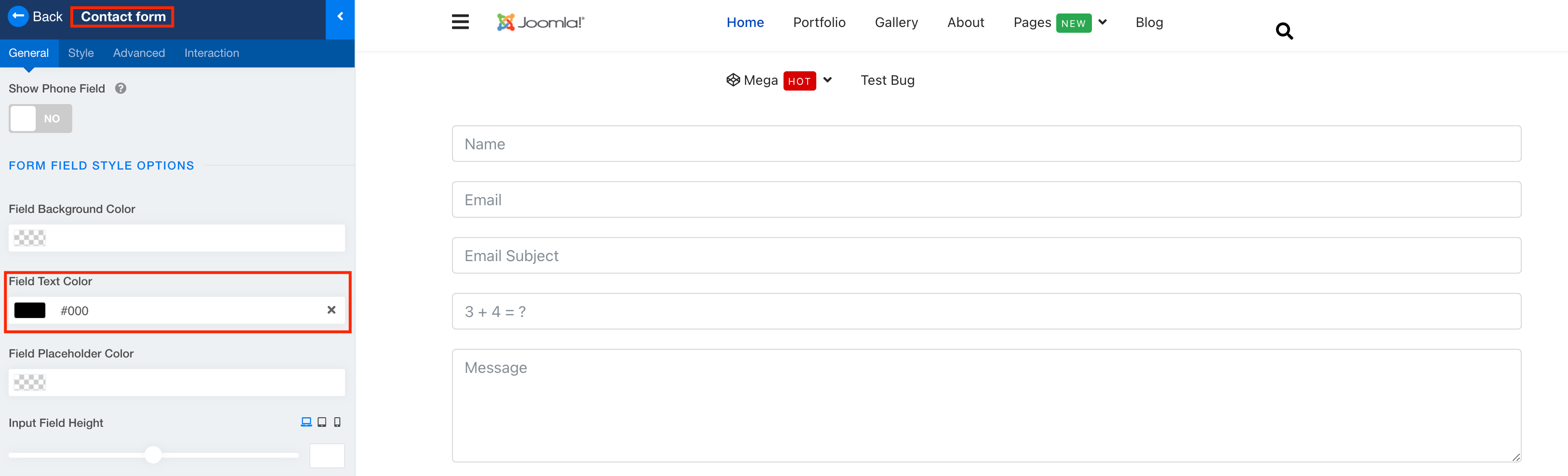
Please go to Contact Form addon settings and set Field Text Color to Black. It will make all the text color Black in the contact form field.
Best regards

Anne
Accepted AnswerHello there,
Thanks for contacting with us. Please, go to form field style options, there you will found field text color. You can make it black or any other color that you want.
-Regards
BC
Brian Cronin
Accepted AnswerRegretfully I have attended to those answers before joining forum. https://golflinks.co.nz/images/Golf_Course_Images/For_Website_Articles/Text_Color.jpg

Any further suggestions welcomed Regards
BC
Brian Cronin
Accepted AnswerThank you Ofi I appreciate the prompt service I have received it is a pleasure to be working with Joomshaper
Best Regards Brian
Ofi Khan
Accepted AnswerI have a humble request. It would be very kind of you if you can manage some moment to give us feedback here: