

Edulif Template Blog

Logica_srl
Hi, I can't find the way to change the image of the main page of the Blog of the edulif template, to be clear the one indicated with dimensions 1920x416 (https://agrario.logica3.it/index.php/blog). Can you tell me how? Thank you
Website
https://www.logica3.it
6 Answers
Order by
Oldest

Rashida Rahman
Accepted AnswerHello,
If you are talking about this: https://prnt.sc/19if4wt
Then, please go to your blog menu item and edit the details within your Page Title tab.
Here is a sample screenshot for you:
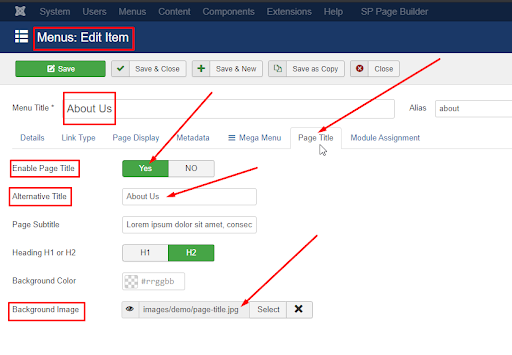
Hope this helps!
Best Regards
Rashida Rahman
Accepted AnswerHi there!
Did you check featured image field in your blog options tab, please?
Best Regards

Ariba
Accepted AnswerGlad to know it worked. Please do let us know if you have any other queries, we are happy to help. If there is no other query, kindly accept the response from Rashida with the solution in order to close & resolve the post.
Thank you