

Equal Height Missing In SP Page Builder 3
NC
Nelson Chan
Hi, how to edit the box to equal height? Latest SP page builder missing this option.

12 Answers
Order by
Oldest

Ofi Khan
Accepted AnswerHello skyhawk
Please share the page URL with the example feature boxes here. I will check and help you.
Best regards
Ofi Khan
Accepted AnswerPlease take a full site backup with Akeeba Backup in ZIP format and share here. Follow this tutorial. Then I will be able to check your issue on my localhost and provide you a fix.

Paul Frankowski
Accepted AnswerHi, I am not sure if this addon has this feature before. You can use custom CSS to set min-height. Tell me what template and addon you're using there. In most cases, it request a single line of custom CSS only.
BTW
Any problem can be solved in at least two ways. If you know CSS is even faster.
Paul Frankowski
Accepted AnswerThanks, now is all clear. Give me a minute. I will check on my demo first.
Paul Frankowski
Accepted AnswerTry this custom CSS:
.sppb-article-info-wrap
{min-height: 400px;}
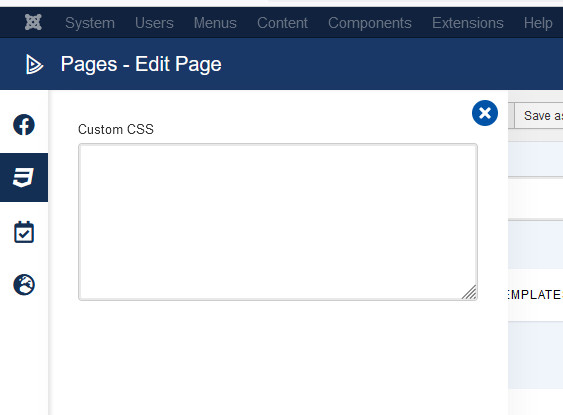
If it would be too high, you can use 380px. THis custom CSS you can ue inside this Page left options - Custom CSS field.
Editor advice: if you are adding "Read more" break inside article content manually always use it after 2nd sentence OR 1st one. Then the appearance will be more consistent. Not as you have now mix. https://snipboard.io/hBTgZG.jpg

Paul Frankowski
Accepted AnswerI put info in my previus post. We have information also in SPPB documenation. But I guess below screenshot will help you more. Do you recognize this view from the page editor backend.?
Paul Frankowski
Accepted AnswerYou're welcome.
BTW
Many useful tips you can find here: https://www.joomshaper.com/documentation/sp-page-builder/sp-page-builder-3/how-to-tips