

How Change Width Offcanvas Menu

Pavel
Dera support team,
I beg you for help. On my website https://marlowstoves.co.uk I have to change the width off-canvas menu (see image 1) because I do not see all text.
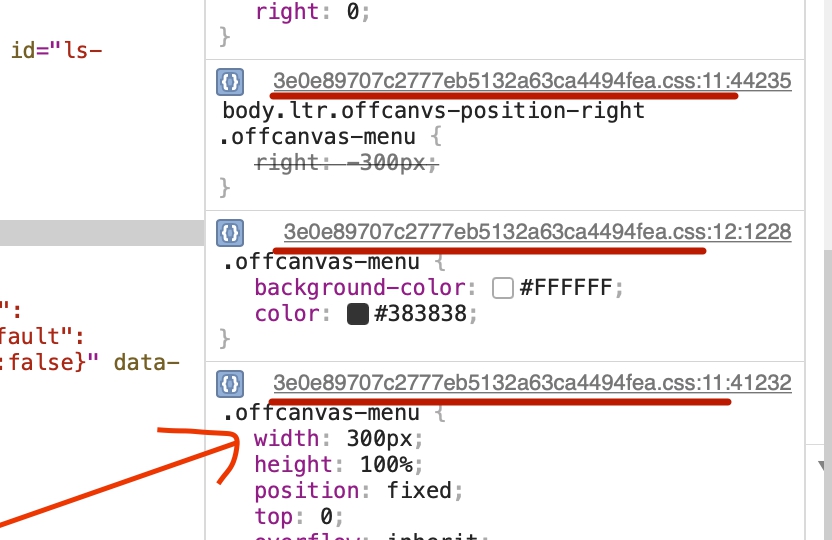
I try to modify the width on the code (see image 2) to size 360px what is good for me, then I paste The modified code on my customm.css file, but when I refresh the page (before refresh the page, I completely flush all caches), I do not see the change. Is there any chance to provide me with what I am doing wrong?
Many thanks,
Pavel


5 Answers
Order by
Oldest

Pavel
Accepted AnswerHi. Judging by the file names, you use JCH Optimize or CloudFlare or something else for caching. You need to clear the cache of this everything, not only Joomla and browser. And every time you need to do this when making changes.
 And by the way. 360px - not a good solution. It is worth navigating the minimum width of 320px. There are a lot of such devices in the world. Therefore, keep a standard width is the best option. Better reduce font size.
In addition, simply changing the width of the menu is not enough. A number of settings are required otherwise your menu will hang around.
And by the way. 360px - not a good solution. It is worth navigating the minimum width of 320px. There are a lot of such devices in the world. Therefore, keep a standard width is the best option. Better reduce font size.
In addition, simply changing the width of the menu is not enough. A number of settings are required otherwise your menu will hang around.

Pavel
Accepted AnswerThe code what I paste on the custom.cee file:
.offcanvas-menu { width: 360px; height: 100%; position: fixed; top: 0; overflow: inherit; -webkit-transition: all 0.6s; transition: all 0.6s; z-index: 10000; }
Pavel
Accepted AnswerDear Pavel.
Thank you for the comprehensive explanation. There are a lot of things I didn't realize. I'll adjust the font size. Thank you very much again for your advice and your time.
Best Wishes, Pavel
